
Education
Back to Blog
General13 min read
How to Connect Incident Reporting, Safety Audits, and Corrective Actions in One System
Most safety teams do not have a data problem. They have a plumbing problem. Incidents get reported in one app or a paper form, audits live in spreadsheets, and corrective actions are assigned in meetings and chased by email. Each piece works alone. Together they leak, and what leaks out is exactly what regulators, clients, and your own leadership eventually ask for: proof that findings turned into fixes.
This guide covers why the three records belong in one system, what the connected loop looks like in practice, what to require from safety software before you pay for it, and a realistic 30-day rollout plan.
Quick answer: You connect incident reporting, safety audits, and corrective actions by running all three on one platform where every incident and audit finding automatically opens a linked corrective action (CAPA) with an owner, a due date, and a verification step, and every completed action traces back to its source and forward to the procedures and training it changed.
Key takeaways
Incidents, audits, and corrective actions are one workflow wearing three names. An incident is an unplanned finding, an audit is a planned one, and a corrective action is what both should produce.
Disconnection has a signature: findings marked “closed” with no evidence, repeat findings under new IDs, and a two-week scramble whenever someone asks you to prove follow-through.
The connected loop is traceable in both directions. Pick any incident and follow it to a verified fix and an updated SOP. Pick any SOP change and trace it back to the event that caused it.
Software makes the loop enforceable, not just possible. The non-negotiables: automatic linkage, owners and due dates on every action, required verification before closure, and an exportable audit trail.
You can connect the loop in 30 days if you migrate workflows one at a time and resist rebuilding history. Start with new incidents, add audits, then route everything through CAPAs.
Three records, one workflow
Look past the tools and the three records describe the same underlying event: something is not the way it should be, and someone needs to fix it.
An incident report says a hazard announced itself: a worker was hurt, a near miss was caught, equipment failed. A safety audit finding says a hazard was found before it announced itself: a guard missing, training lapsed, a procedure out of date. A corrective action is the tracked fix either one should trigger, and the verification that the fix held.
Treating these as three separate systems means the connective tissue between them is a human being remembering to copy information across. That works until the week that person is busy, which is every week. The failure is structural, not personal, and it shows up in predictable places: the audit finding that never became an action, the action that never came back to update the procedure, the incident investigation that cannot find the audit that flagged the same hazard six months earlier.
Standards bodies figured this out long ago. ISO 45001 treats incident investigation, nonconformity, and corrective action as one clause, not three. OSHA expects hazards found in inspections to be corrected and, for injuries, requires records that show what happened and what followed. The paperwork logic is already unified. The tooling in most companies is not.
What disconnection actually costs
The costs hide in ordinary friction, which is why they survive budget reviews.
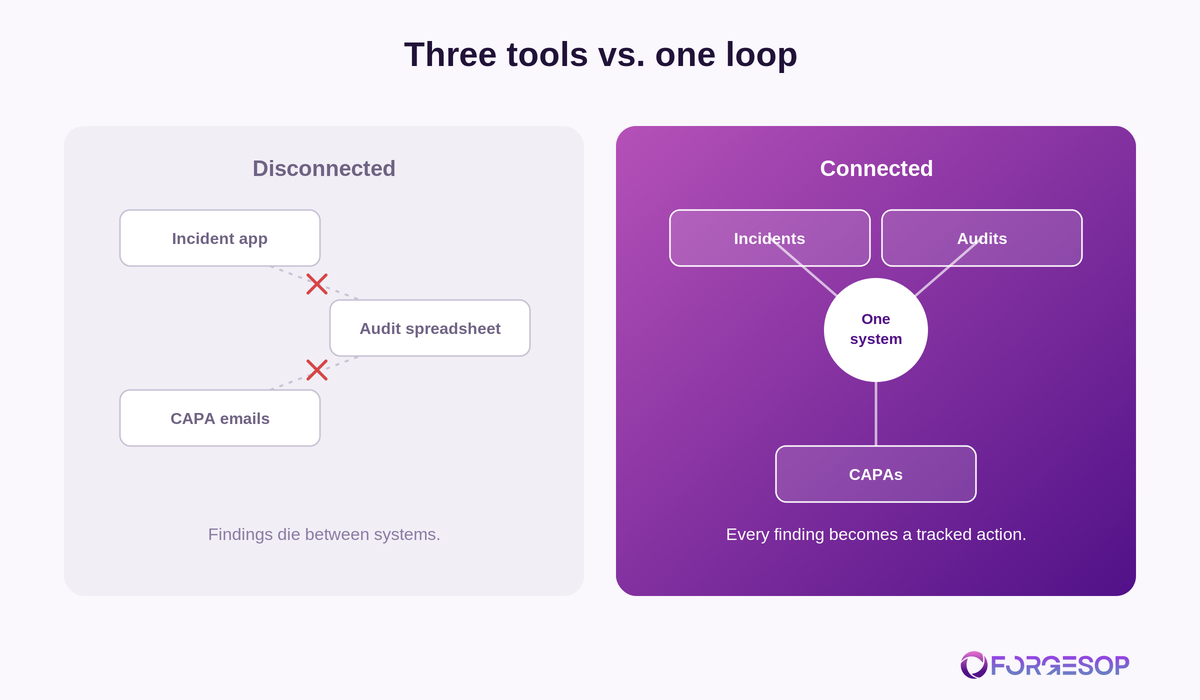
Findings die in handoffs. An auditor writes “housekeeping issue, aisle 4” in a spreadsheet. Nobody owns it, so nothing happens, and the same line appears in next quarter’s audit. At incident-review time, nobody connects the forklift near miss in aisle 4 to the finding that predicted it.
Double entry burns hours and truth. The same event gets typed into an incident form, a tracking spreadsheet, and a monthly report deck. The three versions drift. When a client audit asks which number is right, the answer costs an afternoon.
Closure becomes fiction. Spreadsheets record status, not evidence. “Closed” might mean fixed, verified, and retrained, or it might mean someone tidied the sheet on a Friday. Under audit, the difference is everything, and you cannot reconstruct it after the fact.
The audit trail assembles at the worst time. When a regulator, certifier, or customer asks you to demonstrate follow-through, the trail gets built by hand from emails, spreadsheets, and memory, in the days before the visit. That scramble is the opposite of the [audit-ready operations](/blog/audit-ready-safety-operations) posture the whole system exists to produce.
Leadership flies blind. Open actions, overdue actions, repeat findings by area: this is basic management data, and disconnection means nobody has it without a manual compile. Decisions about where risk lives get made on anecdote.
The closed loop, step by step
Here is the workflow a connected system enforces. It applies identically whether the entry point is an incident or an audit.
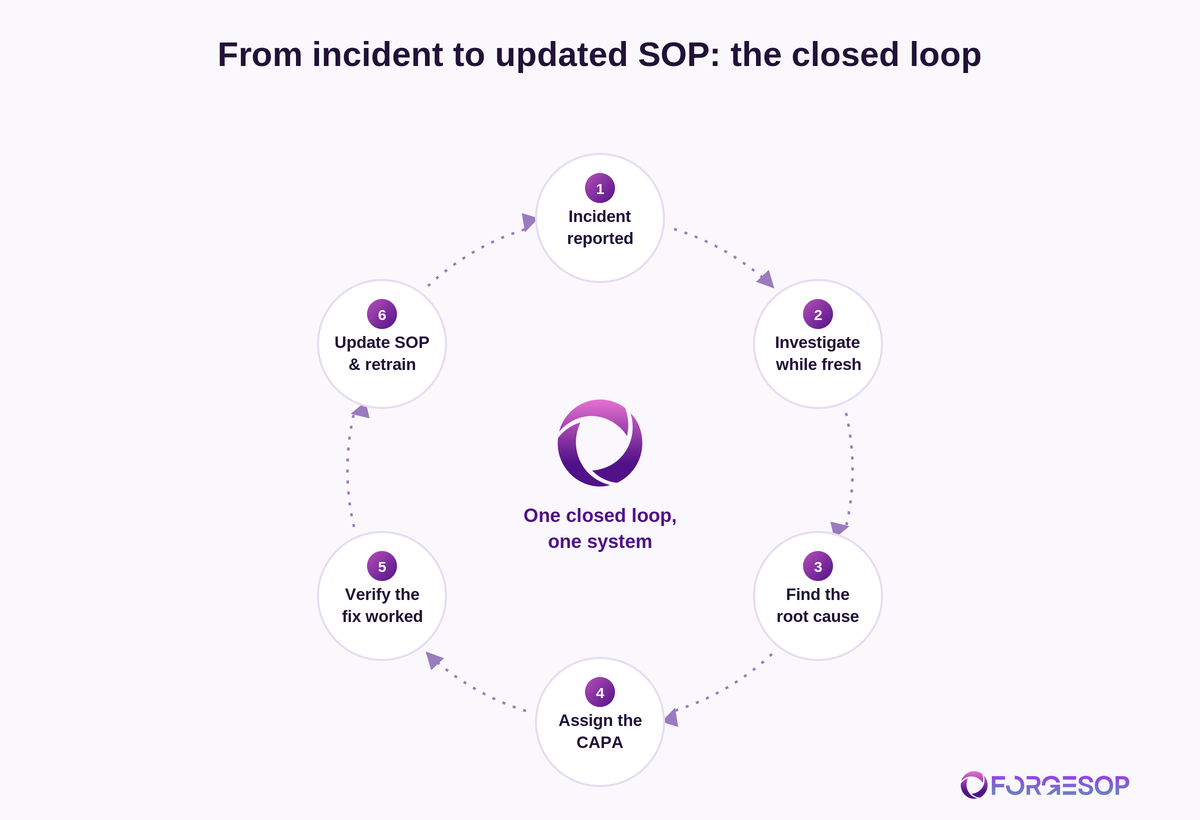
1. Capture at the source. A worker reports the incident or near miss on a phone at the point of work, or an auditor records a finding on a digital checklist mid-walk. No transcription step, no paper stage that waits for a desk.
2. Investigate on the record. The investigation attaches to the same record: photos, witness notes, the SOP version in force at the time, training status of those involved. For serious events, the root cause analysis lives here too, and the [CAPA investigation process](/blog/capa-investigation-process) picks up inside the same chain.
3. Open the corrective action, linked. The CAPA is created from the incident or finding, so the link exists from birth. It carries an owner, a due date scaled to risk, and the specific action to take. Unowned actions are the first thing a connected system makes impossible.
4. Fix, and record the fix. Work happens: the guard is refit, the procedure is revised, the crew is retrained. The record collects the evidence as it happens, including the new SOP version and the training acknowledgments.
5. Verify effectiveness. After a defined interval, someone confirms the fix held: the checklist is being completed, no repeat events, spot check passed. Verification is a required step with a name and date on it. Only then does the record close.
6. Feed the system. The updated SOP becomes the current version everywhere. The next audit checklist inherits a check for the new control. The loop does not just close the finding; it upgrades the system that produced it.
Run that loop for a year and you accumulate something spreadsheets cannot fake: an unbroken, timestamped chain from every event to every fix. That chain is what an inspection audit trail actually means: pick any thread and pull, in either direction, without a scramble.
Ten signs your loop is broken
A quick self-check. Score one point for each statement that is true this month:
At least one audit finding from last quarter has no recorded action against it.
The same finding has appeared in two consecutive audits.
“Closed” items exist with no evidence attached.
An incident investigation took more than a day to locate the SOP version in force at the time.
Corrective actions are tracked in a spreadsheet that one person maintains.
Nobody can say today how many actions are overdue without building a report.
An SOP changed in the last year without a traceable reason.
Retraining after a procedure change is confirmed verbally, not recorded.
Preparing for the last external audit took more than two days of assembling documents.
Near-miss reports dropped when the reporting form moved, or the form requires a desktop.
Zero to two points is housekeeping. Three to five means findings are already leaking. Six or more means your next audit result depends on which threads the auditor happens to pull.
What auditors actually trace
It helps to know how the chain gets tested from the other side of the table. Experienced auditors rarely start with your policies. They pick a record mid-stream and pull in both directions.
A typical thread: take a recordable injury from the OSHA 300 log, ask for the investigation, ask what corrective action came out of it, ask who owned it and when it closed, ask for the evidence it was verified, and finish by asking to see the current version of the procedure it changed and the training records for the crew running that task today. Any gap in that chain is a finding, and the gaps are almost always in the handoffs between systems rather than inside any one of them.
The same trace runs backward: pick a recently revised SOP and ask what prompted the revision. “We do not remember” is an honest answer and a bad one. ISO 45001 surveillance audits, client audits, and OSHA inspections differ in tone and scope, but they share this method, because the chain is where systems fail. A connected platform means every thread they pull is already whole.
What to require from the software
“Safety software with incident reporting and corrective actions” describes half the market, so the selection question is not features. It is whether the loop above is enforced or merely available. Requirements worth putting in writing:
Native linkage. Incidents, audit findings, CAPAs, SOPs, and training records reference each other as first-class links, not as IDs pasted into comment fields. Test it in the demo: open a finding, create the action, and check the trace both ways.
Owners, due dates, and chasing built in. Every action requires an owner and a date to save. Reminders and overdue escalation run automatically, because a system that relies on someone reviewing a dashboard weekly recreates the spreadsheet problem with better fonts.
Verification as a gate, not a field. Closure should be impossible without a recorded effectiveness check. If the tool lets a CAPA close on “done,” findings will close on “done.”
Mobile capture that works where work happens. If reporting an incident or completing an audit checklist requires a desktop login, capture rates will tell you about it within a month.
An exportable, timestamped audit trail. For OSHA visits, ISO surveillance audits, and client audits, you need the chain out of the system in minutes: findings, actions, evidence, dates, sign-offs.
Procedures in the same system. This is the piece most incident tools miss: the loop ends at an updated, version-controlled SOP with retraining tracked. If procedures live elsewhere, the last mile of every corrective action happens off the record. This is the reason ForgeSOP treats SOPs and version control and incidents, investigations, and CAPAs as one platform rather than modules that sync: the record chain from event to updated procedure stays whole by default.
Can you connect the loop without software?
Partly, and it is worth doing even as a stopgap. The manual version is process discipline: one register (a single spreadsheet, not three) where every incident and audit finding gets a row, a unique ID, an owner, a due date, and a verification column that must be filled before the status can read closed. A standing weekly review walks the open rows. Cross-references are typed by hand: the CAPA row carries the incident ID, the SOP revision note carries the CAPA ID.
This beats the disconnected default by a wide margin, and small sites run it successfully for a while. Its ceiling is structural. The links live in text fields, so one typo breaks a chain. Nothing chases owners, so the register decays whenever the coordinator is on leave. Evidence lives in email attachments and photo rolls, findable only by the person who filed it. And the two-directional trace auditors run still takes hours to reconstruct. Treat the manual loop as proof of concept for the habits, and plan the move to a system that enforces them before volume or an audit finds the ceiling for you.
Who owns the connected system
Tools do not own workflows; roles do. The pattern that works: a site safety or quality lead owns the loop itself (register health, weekly review, metrics), supervisors own actions in their areas, and every employee owns reporting. The mistake to avoid is making the system administrator the de facto owner of everyone’s actions, because a chase-everything coordinator recreates the single point of failure the connected system was meant to remove. Ownership distributed, visibility central: that is the shape.
A realistic 30-day rollout
Connecting the loop is a migration of habits more than data. The teams that succeed move one workflow at a time and leave history where it is.
Week 1: incidents. Stand up incident and near-miss reporting on the new system, phones included. Announce that from Monday, this is the only door. Do not migrate old incidents; export the legacy register to read-only storage and move on.
Week 2: audits and inspections. Rebuild your two or three most-used audit checklists digitally and run this month’s audits on them. Findings now land in the same system as incidents.
Week 3: corrective actions. Route every new finding and incident into a linked CAPA with an owner and due date. Import the handful of genuinely open actions from the old spreadsheet; let closed history rest.
Week 4: procedures and proof. Load the SOPs your recent CAPAs touch, connect the loop end to end on one real case, and run your first weekly review from the dashboard: open actions, overdue actions, repeat findings. That meeting, run from live data instead of a compiled deck, is the moment the system pays for itself.
From there, expand checklist coverage and migrate remaining SOPs at working pace. Expect the full library to take a quarter. The loop, though, should be closed within the month.
Rollout mistakes to avoid. Migrating years of closed history first (it delays the go-live for records nobody will open again). Running old and new systems in parallel for months (double entry guarantees the new system loses). Launching every checklist at once instead of the three that matter. And skipping the announcement that the old channels are closed: a loop with two doors is not a loop.
The metrics that matter once connected
The payoff for connection is that management data becomes a byproduct instead of a project. Four numbers belong in your monthly review. Open and overdue corrective actions, by area and owner, because overdue percentage is the truth serum for whether due dates mean anything. Average days from finding to verified closure, scaled by risk category. Repeat findings rate, meaning new findings whose root cause matches something previously closed, which is the effectiveness score for the whole program. And near-miss reporting volume, where rising numbers after rollout are a good sign: they mean capture got easier, not that the site got more dangerous. Watch trend lines rather than single months, and let the worst trend pick the next improvement project.
Frequently asked questions
How do you connect incident reporting, safety audits, and corrective actions in one system?
Run all three on one platform where incidents and audit findings automatically create linked corrective actions with owners, due dates, and a required verification step. Every action then traces back to its source event and forward to the SOP revisions and retraining it produced, giving you a complete audit trail without manual assembly.
What is safety software with incident reporting and corrective actions?
It is EHS software that captures incidents and near misses, runs audits and inspections on digital checklists, and manages the resulting corrective and preventive actions (CAPAs) in one linked record chain. Stronger platforms also hold the SOPs and training records the actions change, so the loop closes inside one system.
What is an inspection audit trail?
An inspection audit trail is the timestamped, connected record showing what was found, what action was taken, who owned it, what evidence closed it, and what changed as a result. Auditors test it by picking a finding at random and tracing it to a verified fix, and by picking a procedure change and tracing it back to its cause.
Does OSHA require safety software?
No. OSHA requires outcomes and records: recordable injuries logged, hazards corrected, specific written programs maintained. Software is never mandated, but a connected system makes producing those records during an inspection a matter of minutes instead of days, and repeat-finding patterns visible before an inspector finds them for you.
What is the difference between an audit finding and a CAPA?
An audit finding is the observation: a condition that does not meet the standard. A CAPA is the tracked response: the investigation, the corrective and preventive actions with owners and dates, and the verification that the fix worked. A finding without a CAPA is a note; the loop is only closed when the finding’s CAPA is verified and done.
How long does it take to implement a connected safety system?
For a single site with a focused scope, about 30 days to run incidents, audits, and CAPAs in one loop: incidents in week one, audits in week two, linked actions in week three, and connected SOPs plus a live management review in week four. Full SOP libraries and multi-site rollouts typically extend over a quarter.
Ready to close the loop? Start with ForgeSOP for free and run incidents, audits, CAPAs, and the procedures they change in one audit-ready system.
General
Forge better processes
One platform. Always audit-ready.
Bring SOPs, checklists, audits, incidents, and CAPAs into one connected system for safer, clearer, and more consistent operations.
No credit card required · Built for teams that run on process