
Education
Back to Blog
General18 min read
Administrative SOPs: What They Are, Examples, and How to Write One
The invoice was approved. Everyone agrees on that. What nobody can say is who approved it, where the approval lives, or why the vendor is still calling about payment six weeks later. Meanwhile a new hire is on day three of waiting for a laptop, the contracts folder holds four versions of the same agreement, and the one person who knows how travel booking actually works is out until Monday.
None of this will ever appear in an incident report. That is exactly the problem.
Office and support processes fail quietly, one stalled approval and one misfiled document at a time. Because no regulator demands a written procedure for onboarding a vendor or filing a contract, most organizations never write one, and the cost hides in waiting, rework, duplicate spend, and the occasional expense report nobody looked at too closely.
Administrative SOPs exist to make that invisible work visible, repeatable, and checkable. This guide covers what an administrative SOP is, which office procedures to document first, what belongs inside each one, and a seven-step method for writing administrative procedures that people actually follow.
Quick answer: An administrative SOP (standard operating procedure) is a written, step-by-step instruction for the recurring office and business-support tasks that keep an organization running: purchase requests, vendor onboarding, expense reimbursement, travel approval, document filing, and records retention. Each one names who does each step, the approval thresholds that apply, and where the finished record lives.
Key takeaways
Administrative SOPs document the office and support processes behind the core work: purchasing, expenses, travel, filing, scheduling, correspondence, records, and recurring reports.
Their defining feature is the handoff. Most administrative work crosses several desks and systems before it is done, so these procedures are written around routes, approvals, and turnaround times, not just task steps.
The "low stakes" label is misleading. Several administrative tasks are legally bounded (payroll records, employment tax records), and procedures like expense approval are internal controls in writing.
Weak administrative controls are how money leaks. The Association of Certified Fraud Examiners estimates organizations lose 5% of revenue to fraud each year, and more than half of the cases it studied traced back to missing or overridden internal controls.
The time cost is real too: McKinsey Global Institute research found knowledge workers spend nearly 20% of the workweek just searching for internal information or tracking down colleagues.
Administrative SOPs decay faster than any other type, because org charts, systems, and thresholds change constantly. Treat each one as a living document with an owner, a version, and review triggers.
What is an administrative SOP?
An administrative SOP is a standard operating procedure that documents a recurring office, management, or business-support process: the work that keeps the organization functioning but does not directly produce the product or service. It takes a routine that currently lives in someone's head (how purchases get approved, where signed contracts are filed, how an expense claim becomes a bank transfer) and turns it into named steps with owners, thresholds, timelines, and a record at the end.
The category is broad by design. It covers money movement (purchase requests, expense reimbursement, invoice handling), information movement (document filing, records retention, correspondence, shared inboxes), and coordination (scheduling, meeting management, travel approval, office supplies). What unites them is that each one is a support process serving every department at once, which is precisely why no single department feels responsible for writing it down.
If the term SOP itself is new ground, start with our plain-language guide to what an SOP is and come back; this article assumes the basics and goes deep on one category.
One more framing that will pay off later: most administrative procedures are routes, not tasks. A machine changeover happens at one station, performed by one trained operator. A purchase request is born at one desk, approved at a second, processed at a third, and filed by a fourth, usually across two or three software systems. The procedure has to describe the journey, or it has described nothing.
How are administrative SOPs different from operational SOPs?
Every SOP type shares the same skeleton: numbered steps, named roles, a revision block. What changes is the risk each type exists to control. An operational SOP protects the consistency of your core work. A safety SOP protects the person doing the work, and a quality SOP protects the product. An administrative SOP protects the flow of business itself: the approvals, documents, payments, and schedules that every other function depends on to keep moving.
Operational SOPs | Compliance SOPs | Administrative SOPs | |
|---|---|---|---|
Primary job | Keeping core work consistent and repeatable | Meeting external requirements and proving it | Keeping business support flowing across desks |
Typical trigger for writing one | Variation, rework, a new line or shift | A regulation, permit, standard, or contract clause | Stalled approvals, lost documents, repeated questions |
Core content | Task steps, parameters, checkpoints | Requirement reference, duties, deadlines, records | Workflow route, approval thresholds, templates, handoffs |
Cost of failure | Downtime, rework, inconsistent output | Citations, fines, lost permits and contracts | Delays, duplicate spend, fraud exposure, lost records |
Review cadence | Annual, plus after process or equipment changes | Annual, plus every rule or permit change | Annual, plus every reorg, system, or policy change |
Sign-off | Operations lead | Compliance owner, often with legal review | Department head or office manager |
The row that matters most day to day is core content. Operational procedures live inside a task, so they obsess over parameters and sequence. Administrative procedures live between people, so they obsess over who hands what to whom, at what dollar threshold the approver changes, and how long each stage is allowed to take. An administrative SOP without turnaround times is a wish list; nothing in it can ever be late, so nothing in it can ever be escalated.
In practice the categories overlap, and that is fine. An expense reimbursement procedure is administrative through and through, and it is also a fraud control. A records retention procedure is administrative housekeeping, and it also satisfies legal retention duties, which makes it a compliance SOP wearing office clothes. The fix is never to write two overlapping documents. Write one SOP for the process and tag it into both categories.
The cost of undocumented admin work never shows up as a line item.
That is why it survives budget review after budget review. But the evidence says the bill is real, and it arrives in three currencies.
The first currency is time. McKinsey Global Institute research on knowledge work found that interaction workers spend nearly 20% of the workweek searching for internal information or tracking down a colleague who can help with a task. That is close to a day per person per week spent looking for things, and it is a direct symptom of undocumented filing conventions, unclear owners, and processes that exist only as tribal knowledge. A filing SOP and a named system of record are unglamorous, and they attack exactly this number.
The second currency is money, through the control gap. The Association of Certified Fraud Examiners (ACFE) studied 1,921 real fraud cases for its Occupational Fraud 2024: A Report to the Nations and estimates that organizations lose 5% of revenue to fraud each year, with a median loss of $145,000 per case and a median run time of 12 months before detection. More than half of the cases studied were tied to a lack of internal controls or an override of the controls that existed. Read that finding again with your office in mind: approval thresholds, segregation between the person who requests and the person who pays, mandatory receipt rules. Those controls are not a system you buy. They are sentences in an administrative SOP, and if they are not written down, they are opinions.
The third currency is legal exposure, in the records. The office is where legally bounded paperwork lives. The U.S. Department of Labor requires payroll records to be kept at least three years under the Fair Labor Standards Act (FLSA), with wage-computation records such as time cards and schedules kept two years. The Internal Revenue Service (IRS) says to keep employment tax records at least four years after filing the fourth quarter for the year. OSHA injury logs carry a five-year retention of their own. A retention procedure is the difference between meeting those duties by design and meeting them by luck.
Why does nobody write these procedures down?
Because administrative work is learned by apprenticeship. Nobody hands the new office coordinator a procedure; they hand them a colleague. "Ask Dana, she knows how the purchase orders work" is a sentence spoken somewhere every business day, and it works right up until Dana leaves. The U.S. Bureau of Labor Statistics puts median employee tenure at 3.9 years as of January 2024. Your filing system, your vendor list, and your approval routes will all outlast the person who currently understands them.
A process that lives in one person's head is one resignation away from not existing.
There is also a status problem, and it is worth naming. Administrative procedures rarely have a champion, because writing them feels like admitting the work is routine. The reality is the opposite. Documenting a support process is what frees the experienced person from being its bottleneck, and it is the only way the process improves rather than merely repeats.
Which administrative SOPs should you write first?
No office needs forty procedures by Friday. Across industries, the highest-value administrative SOPs cluster into six families. Start where your money and your friction already point.
Purchasing and vendor management. How a purchase request is raised, who approves at which threshold, how a new vendor is onboarded (tax forms, banking details, contract terms), and how invoices are matched to orders before payment. This family moves the most money with the least supervision, which is why it comes first.
Expenses and travel. Reimbursement claims, corporate card use, travel approval, and receipt requirements. These procedures double as fraud controls, and they are also where employees most often feel the sting of inconsistency: two people, same trip, different outcomes.
Document control and filing. Naming conventions, folder structures, version rules, access rights, and the single agreed place where each document type lives. This is the quiet fix for the search-time problem, and every other family depends on it.
Records retention and disposal. What to keep, in what form, where, for how long, and how records are destroyed when their time is up. Retention duties come from outside (tax, payroll, safety), so build this one hand in hand with your compliance procedures.
Scheduling and correspondence. Meeting room booking, shared calendars, mail handling, shared inbox ownership, and phone or front-desk routines. Small stakes per event, enormous stakes in aggregate, because these are the processes everyone touches every day.
Recurring reports and data entry. The month-end administrative checklist, data entry standards for the CRM or ERP, and the recurring internal reports with a named owner and a due date. Bad data entry today is a bad decision two quarters from now.
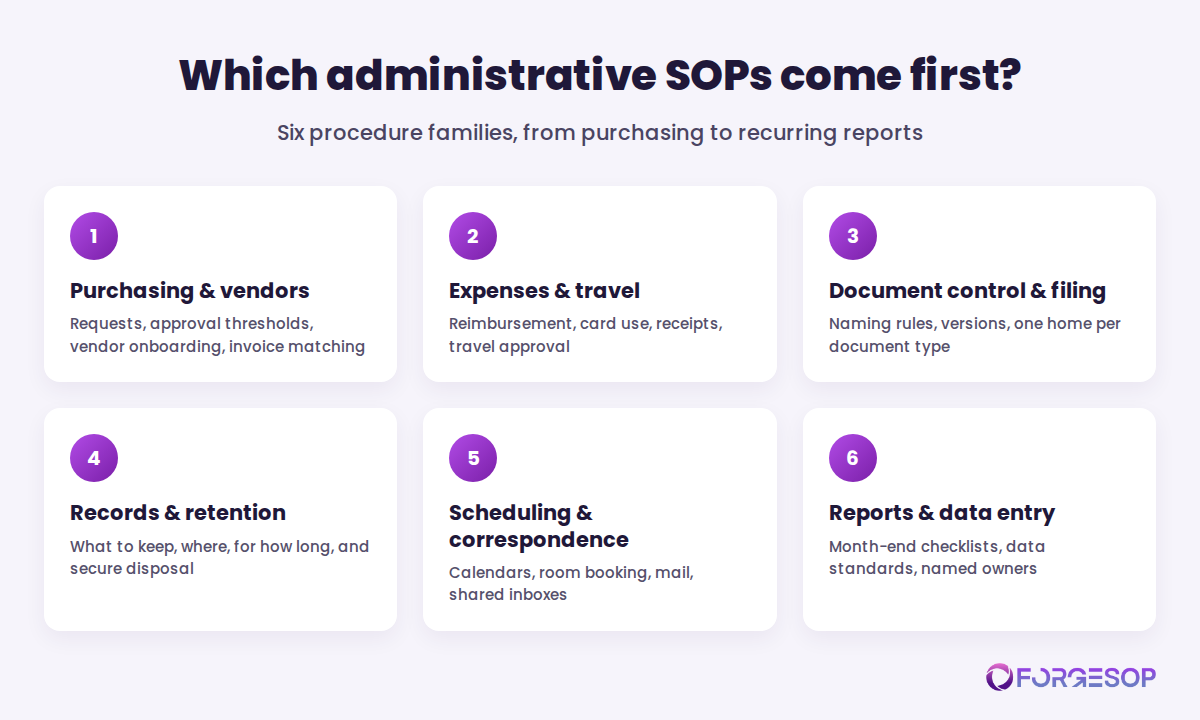
Two rules set the order inside the families. Follow the money: any procedure that moves or approves spend (purchasing, expenses, invoices) gets documented first, because that is where control gaps are most expensive. And follow the friction: whatever process generates the most repeated questions, chasing emails, and "quick calls" is, by definition, the one your team is already begging you to write down.
What does an administrative SOP include?
Format matters less than completeness, but strong administrative SOPs share ten building blocks:
Title and unique ID, such as SOP-112, so versions, training, and cross-references stay traceable
Purpose and scope: the process covered, which departments and roles it applies to, and what it deliberately excludes
Roles and responsibilities: who requests, who approves, who processes, who files, each with a named backup
Definitions: the acronyms and internal shorthand spelled out once, so the next reader does not have to guess
Triggers: what starts the process (a form submitted, an email to a shared inbox, a calendar date, a threshold crossed)
Approval thresholds and authority limits: who can sign at what amount, and what needs two signatures
Numbered steps in sequence: one action per step, naming the system used, the template used, and the data entered
Handoffs and turnaround times: who passes what to whom, and how long each stage may take before escalation
The record: what proves the process completed, where it is filed, under what name, and how long it is retained
Revision block and review triggers: version, author, approver, effective date, next review date, and the changes that reopen the document early
Two of these blocks do the heavy lifting, and they are the two most often missing.
Thresholds turn policy into a control. "Manager approval required" is a vibe. "Purchases under $500 need a supervisor, $500 to $5,000 a department head, above $5,000 the finance director, and no one approves their own request" is a control an auditor can test and a new hire can follow on day one. Remember the ACFE finding: more than half of fraud cases involved controls that were missing or overridden. Thresholds written into a procedure, with no self-approval, are the cheapest fraud prevention you will ever buy.
Turnaround times make lateness visible. Administrative processes rarely fail loudly; they fail by waiting. A reimbursement that sits in an approval queue for three weeks is a process failure, but without a stated turnaround, it is nobody's failure. Give every handoff a clock ("manager approves or queries within 5 business days") and every clock an escalation path. The procedure should fail loudly while the fix is still cheap.
What does an administrative SOP look like in practice?
Here is the skeleton of a real one, trimmed for space.
SOP-112: Expense reimbursement (v1.4, owner: Finance Manager, review due: August 2027). Purpose: reimburse legitimate business expenses accurately, quickly, and with an audit trail. Scope: all employees, covering out-of-pocket expenses and corporate card reconciliation; capital purchases are excluded and routed to SOP-108, purchasing. Roles: the employee submits a claim within 30 days of the expense using the standard template, with itemized receipts attached; the line manager approves or queries within 5 business days, with authority to $1,000; the department head approves anything above that; the accounts payable (AP) coordinator checks coding, screens for duplicates, and processes payment within 10 business days of final approval; the Finance Manager owns the document and reviews exceptions monthly. Steps cover claim entry in the expense system, receipt capture standards, cost center coding, the duplicate check, approval routing, and the payment run. Records: claims and receipts are filed by month in the finance system and retained at least four years, in line with IRS employment tax recordkeeping. Exceptions: a missing receipt requires a signed substitute declaration and department head approval; out-of-policy spend needs written pre-approval before the expense is incurred; suspected duplicates or altered receipts go to the Finance Manager, not back to the claimant.
None of it is sophisticated. All of it is checkable, and that is the entire point. When a new manager asks "what am I allowed to approve?", the answer is a document, not a hallway conversation, and when the auditor samples March, the trail is already there.
How to write an administrative SOP in 7 steps
The method matters more than the template, and for administrative procedures the method starts with a walk, because the process on paper and the process in real life are rarely the same thing.
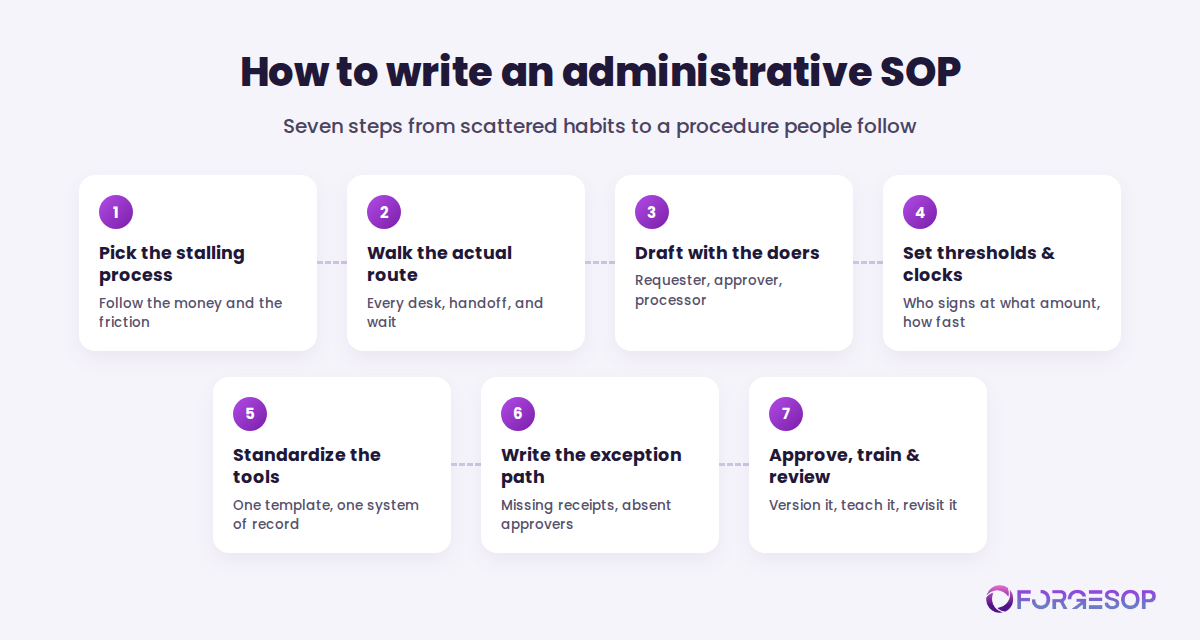
Pick the process that stalls most often. Use the two rules from earlier: follow the money, then follow the friction. One procedure that unblocks purchasing beats five procedures about supply cupboards. Resist the urge to start with the easiest one; start with the one people complain about.
Walk the route it actually travels. Follow one real purchase request or expense claim from birth to filing. Note every desk it crosses, every system it enters, every place it waits, and every judgment call made along the way. The waits and the judgment calls are the material; they are what the SOP exists to resolve.
Draft with the people on the route. The requester knows where the form is confusing, the approver knows which requests give them pause, and the processor knows the workarounds that keep the system usable. A procedure written by one person at a distance will be quietly corrected in practice, and then the document and reality drift apart from day one.
Set thresholds and turnaround times in the text. Approval limits by role and amount, no self-approval, and a clock on every handoff with an escalation path when it expires. This is the step that turns a description into a control, so do not let it stay vague to avoid awkward conversations. The awkward conversation is the deliverable.
Standardize the tools. One template per form, one naming convention, one system of record per document type, all named inside the procedure. Every "or just email it to me" you remove deletes a place where requests go to die.
Write the exception path while nobody needs it. The missing receipt, the absent approver, the urgent purchase at 4:55 on a Friday, the vendor who cannot provide a tax form. Name who decides, what evidence substitutes, and what gets logged. Exceptions handled by improvisation become precedents; exceptions handled by procedure stay exceptions.
Approve, publish, train, and set review triggers. Route the document for sign-off, publish it where the work happens, and walk each role through its part once. Then tie reviews to events as well as the calendar: a reorganization, a new finance or HR system, a changed policy threshold, an audit finding, or a fraud near-miss each reopens the document automatically.
An administrative SOP is only useful where people actually look.
Here is the uncomfortable trait of this SOP type: administrative procedures decay faster than any other kind. Safety procedures change when equipment or regulations change. Administrative procedures change every time the org chart moves, an approver changes roles, a software system is replaced, or a spending threshold shifts with the new budget. Write them once and walk away, and within a year the document describes a company that no longer exists.
The failure mode is familiar. The procedure says invoices go to a person who left in March. The template linked in step 4 is two versions old. The printout taped by the scanner still shows last year's thresholds, so half the office follows version 3 while policy is on version 5. We dissected what that drift costs in the hidden cost of uncontrolled SOPs, and administrative documents are its favorite victims, because they change often and nobody audits them until money goes missing.
The countermeasures are the same ones that work everywhere, applied with more discipline. Every administrative SOP gets a single named owner and a deputy. Every document lives in one place your team can search, not in inboxes and desktop folders, and superseded versions leave circulation the day a new one is approved. Purpose-built SOP management software makes this structural rather than heroic, keeping each procedure versioned, approved, and findable, with review dates that nag the owner instead of relying on memory. However you solve it, solve the findability problem first. A procedure nobody can locate in thirty seconds does not exist, no matter how well it is written.
In short, the office does not need more documentation. It needs one current, findable version of each process that matters, and a name attached to keeping it that way.
The bottom line
Administrative SOPs are where the invisible work of running a business stops depending on memory. They will never star in an audit the way safety and compliance procedures do, but they decide how fast money moves, whether records exist when the law asks for them, and how much of every week your team spends searching for things that should have been findable.
Start with five documents: purchase approval, expense reimbursement, vendor onboarding, filing conventions, and records retention. Write the route, not just the task: thresholds, handoffs, turnaround times, and the record at the end. Give each document an owner, a deputy, and review triggers tied to reorgs and system changes, because these procedures decay fastest of all.
The office runs on routines either way. The only question is whether those routines are written down where the next person can find them, or whether they walk out the door with the next resignation.
Frequently asked questions
What is an administrative SOP?
An administrative SOP (standard operating procedure) is a written, step-by-step document for a recurring office or business-support process, such as purchasing, expense reimbursement, document filing, records retention, scheduling, or correspondence. It names who performs each step, the approval thresholds and turnaround times that apply, the systems and templates used, and the record that proves the process was completed.
What are examples of administrative SOPs?
Common examples include purchase request and approval, vendor onboarding, expense reimbursement, corporate travel approval, invoice processing, document filing and naming conventions, records retention and disposal, meeting room booking, shared inbox and mail handling, and month-end reporting checklists. Any routine support process that crosses more than one desk is a candidate.
What is the difference between an administrative SOP and an operational SOP?
An operational SOP documents the core work that produces your product or service, so it focuses on task steps, parameters, and checkpoints within a single role or station. An administrative SOP documents the support processes around that work, so it focuses on routes: who requests, who approves at which threshold, who processes, how long each handoff may take, and where the record is filed.
Are administrative SOPs required by law?
The procedures themselves are rarely mandated, but several of the tasks they govern are. Under the Fair Labor Standards Act, payroll records must be kept at least three years, and the IRS expects employment tax records to be kept at least four years. A written retention and filing procedure is the practical way to meet duties like these consistently, rather than depending on individual habits.
How detailed should an administrative SOP be?
Detailed enough that a competent new hire can complete the process without asking a colleague, and no more. Include every threshold, template, system, and turnaround time, because those are the parts people misremember. Leave out background explanation that does not change what the reader does. If the document runs past a few pages, split it by sub-process rather than letting it become a manual.
How often should administrative SOPs be reviewed?
Review each one at least annually, and immediately after the events that actually break them: a reorganization, a change of approver or owner, a new software system, a revised spending threshold or policy, an audit finding, or a fraud near-miss. Administrative procedures decay faster than other SOP types because org charts and systems change constantly, so event-based triggers matter more than the calendar.
Who should write administrative SOPs?
Draft them with the people on the route: the person who submits, the person who approves, and the person who processes. The department head or office manager owns the document, sets thresholds with finance where money is involved, and signs off. Writing by committee is unnecessary, but writing at a distance from the actual work guarantees a procedure that practice quietly ignores.
Getting your office procedures out of inboxes and into one place? ForgeSOP gives every administrative SOP an owner, a current version, and a home your whole team can find in seconds.
General
Forge better processes
One platform. Always audit-ready.
Bring SOPs, checklists, audits, incidents, and CAPAs into one connected system for safer, clearer, and more consistent operations.
No credit card required · Built for teams that run on process