

General
Back to Blog
General6 min read
Hierarchical SOP Format: What It Is, an Example, and How to Write One
A machine changeover procedure runs to 32 numbered steps. Experienced operators know the first half by heart, so they skim it. Last month a new step was added at number 14 after a near miss with a guard. Nobody noticed.
Long flat lists hide changes. They also hide the shape of the work.
The hierarchical steps format solves both problems by grouping a long task into a few main steps, each with sub-steps underneath. It is one of the eight types of SOP formats, and the natural next step up from a simple numbered list. In this article, we cover what the format is, when to use it, a worked example and how to write one in six steps.
Key takeaways
A hierarchical SOP uses numbered main steps with lettered sub-steps that hold the detail.
Use it for tasks with more than about ten steps and no real decisions along the way.
Keep it to two levels. A third level is a sign the task should be split into two SOPs.
Experienced workers can read the main steps, while new workers read every line.
What is the hierarchical SOP format?
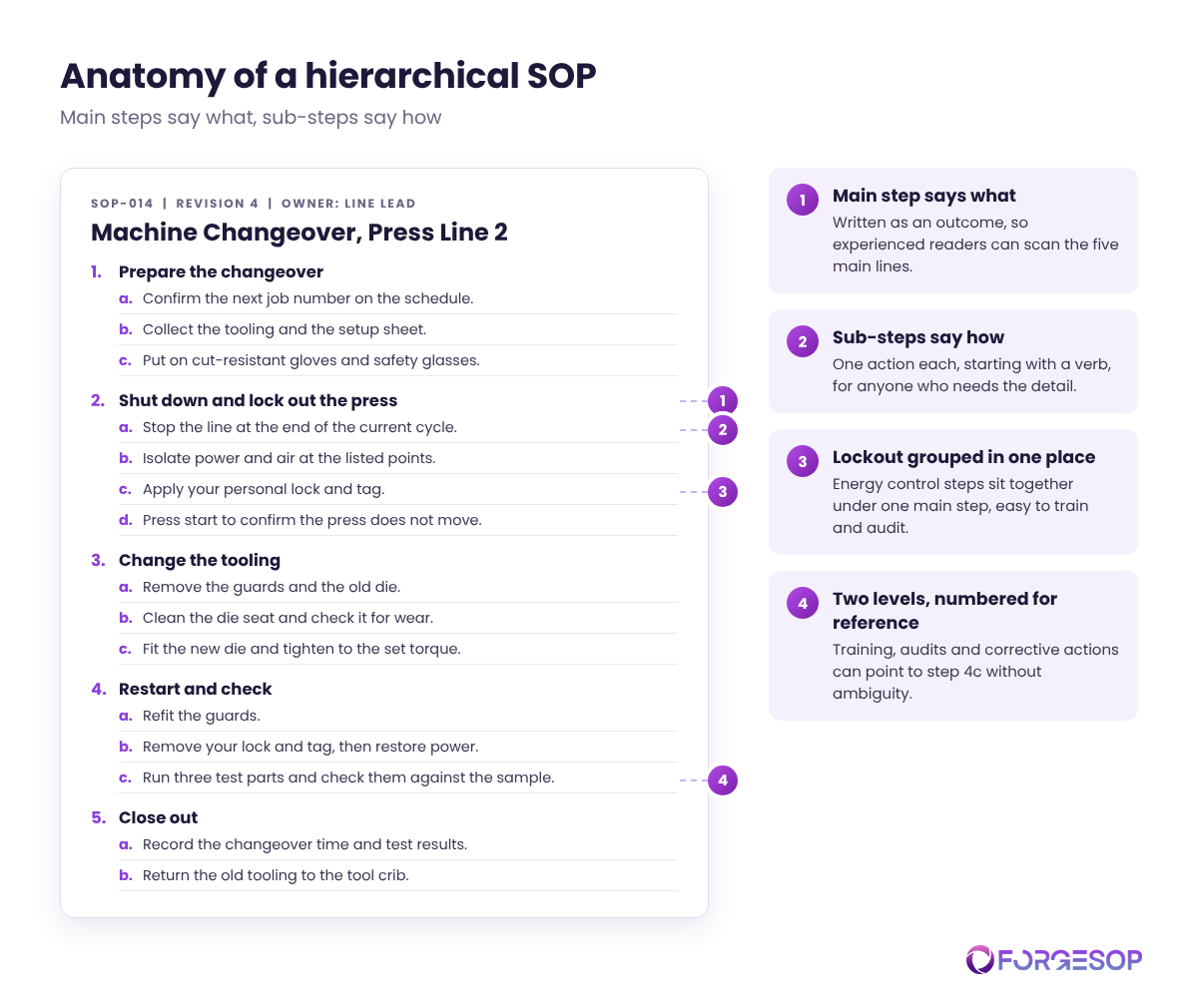
The hierarchical format is a standard operating procedure (SOP) laid out as an outline. Main steps say what happens. Sub-steps say how.
A main step such as "Shut down and lock out the press" might hold four sub-steps: stop the line, isolate the energy sources, apply your lock and tag, then test that nothing moves. The reader sees the shape of the task at a glance and the detail when they need it.
Some regulations push you toward this structure. The process safety management (PSM) standard from the Occupational Safety and Health Administration (OSHA), which covers processes involving highly hazardous chemicals, requires written operating procedures with steps for each operating phase, from initial startup and normal operations to emergency shutdown and startup after a turnaround. Seven phases, each with its own steps, is a hierarchy by nature.
When should you use the hierarchical format?
The writing guide Penn State published for dairy farm businesses in 2001 gives a simple test: if a task has more than ten steps and no decisions, use hierarchical steps or a graphic format.
Use the hierarchical format when:
The task is long but linear. It runs in a fixed order, such as a changeover, a calibration or a month-end close.
The work has natural phases. Prepare, do, check and close out are common groupings.
Readers have mixed experience. Veterans need the outline, while new starters need the detail.
People need to point at a step. Training records, audits and corrective actions can refer to "step 2c" without ambiguity.
If the task is short, simple steps will do. If it branches on answers, use a flowchart.
Hierarchical SOP example
SOP-014: Machine Changeover, Press Line 2
Owner: Line Lead. Revision 4.
Prepare the changeover.
Confirm the next job number on the production schedule.
Collect the tooling and the setup sheet for that job.
Put on cut-resistant gloves and safety glasses.
Shut down and lock out the press.
Stop the line at the end of the current cycle.
Isolate power and air at the points listed in the energy control procedure.
Apply your personal lock and tag.
Press the start button to confirm the press does not move.
Change the tooling.
Remove the guards and the old die.
Clean the die seat and check it for wear.
Fit the new die and tighten the bolts to the torque on the setup sheet.
Restart and check.
Refit the guards.
Remove your lock and tag, then restore power.
Run three test parts at low speed and check them against the approved sample.
Close out.
Record the changeover time and test results in the log.
Return the old tooling to the tool crib.
Five main steps and fifteen sub-steps. An experienced operator can read the five main lines in seconds. A new operator reads all twenty.
Notice where the lockout lives. OSHA's lockout/tagout standard requires specific procedural steps for shutting down, isolating, blocking and securing machines. In a hierarchical SOP those steps sit together under one main step, which makes them easy to find, train and audit. Our guide to safety SOPs covers energy control in more depth.
How to write a hierarchical SOP in 6 steps
List every action first. Walk the task with the people who do it and capture each action in order, before you worry about structure.
Group the actions into phases. Three to seven main steps is a comfortable range for most tasks.
Write each main step as an outcome. "Shut down and lock out the press" tells the reader what done looks like.
Write each sub-step as one action. Start with a verb and keep it to a single line.
Stop at two levels. If a sub-step needs its own sub-steps, split the task into two SOPs or move the detail into an attachment.
Number for reference. Use 1, 1a, 1b so that training, audits and incident reports can point to an exact step.
Two levels are enough
Hierarchical SOPs fail in predictable ways:
Going too deep. Numbering like 2.3.1.4 belongs in contracts, not on the shop floor.
Main steps that are really actions. If a main step has no sub-steps, it probably belongs inside another one.
Decisions hidden in sub-steps. One small "if" is fine. A chain of them needs a flowchart.
Silent changes. When you add or move a step, mark what changed and brief the people who use it.
For covered processes, OSHA's PSM standard requires employers to certify every year that operating procedures are current and accurate. That is a good habit for any long SOP. Purpose-built SOP management software keeps each revision on record, so you can see exactly what changed and who has acknowledged it.
Which formats pair well with hierarchical steps?
Graphic SOPs can sit under a main step, such as a photo of each isolation point under the lockout step.
Simple steps cover the shorter routine tasks in the same area.
A flowchart takes over when the task starts to branch.
For the full picture, see our guide to types of SOP formats.
The bottom line
The hierarchical format turns a wall of steps into something people can scan, follow and audit. It respects the experience of your veterans without leaving new starters guessing.
Pick your longest flat SOP, group its steps into phases, and see how much easier it becomes to read.
Frequently asked questions
What is the difference between simple steps and hierarchical steps?
Simple steps are a single numbered list for short tasks. Hierarchical steps add a second level, with main steps that group related sub-steps, for longer tasks of more than about ten steps.
How many levels should a hierarchical SOP have?
Two: main steps and sub-steps. A third level makes the document hard to follow on the job and usually means the task should be split.
Can a hierarchical SOP include decisions?
Only small ones, such as a single "if the part fails, scrap it" sub-step. When the task has several decision points, a flowchart shows the paths far more clearly.
Want every SOP in one place, whatever its format? ForgeSOP keeps your procedures versioned, acknowledged, and reviewed on schedule, so the steps people follow are always the current ones.
General


Forge better processes
One platform. Always audit-ready.
Bring SOPs, checklists, audits, incidents, and CAPAs into one connected system for safer, clearer, and more consistent operations.
No credit card required · Built for teams that run on process