
General
An SOP format is the layout a standard operating procedure (SOP) uses to present its steps, such as a numbered list, a checklist or a flowchart. Knowing the different types tells you which one fits a task before a hard-to-follow procedure causes a mistake.
In this article, we walk you through each type of SOP format with everyday examples. Then we cover the formats common in different workplaces, how to choose a format and what to do before you publish an SOP.
Key Takeaways
The eight main types of SOP formats are simple steps, hierarchical steps, checklist, table, flowchart, swimlane, graphic and video formats, each named for how it lays out the work.
Most workplaces use several formats at once: an office relies mainly on simple steps, tables, flowcharts and swimlanes, while a factory or a hospital uses five of the eight.
To choose an SOP format, count the steps, the decisions and the roles in the task, then look at who follows the procedure and where they read it.
To keep SOP formats consistent, start with the simplest format that fits, add structure only when the task demands it, and add photos or video last.
Regulators set what a procedure must contain, not how it must look, so the format is your decision.
Before you publish an SOP, pick the format, draft it with the people who do the job, test it where the work happens and put it under version control.
In a 2009 study of eight hospitals in the New England Journal of Medicine, a 19-item surgical checklist cut deaths from 1.5% to 0.8% and major complications from 11.0% to 7.0%.
What Are the Main Types of SOP Formats?
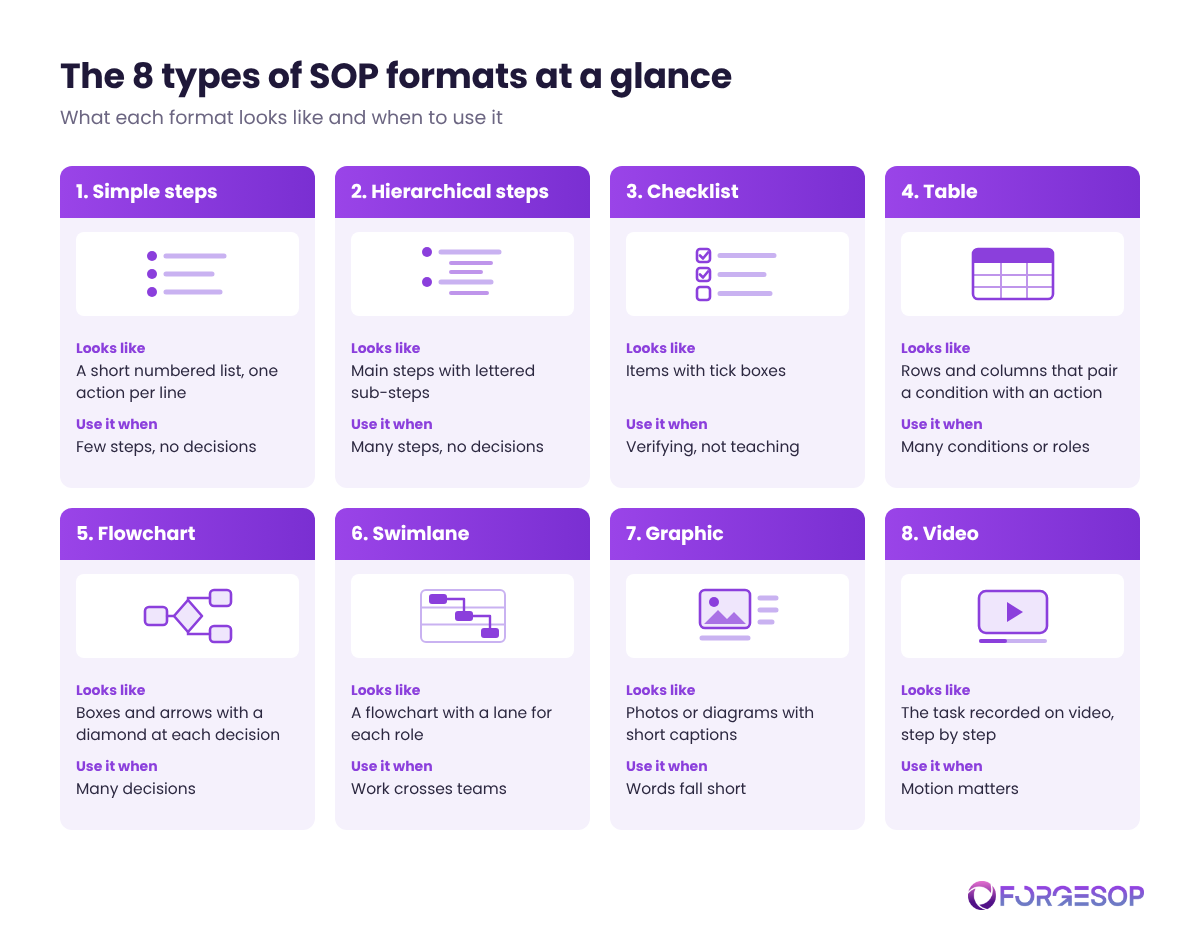
Most SOPs use one of eight formats, and they fall into two broad families: text formats and visual formats. Each family has four formats, which makes eight in total.
Text formats are read line by line, and they are quick to write and update. They fall into four types:
Simple steps: a short numbered list with one action per line
Hierarchical steps: numbered main steps with lettered sub-steps underneath
Checklist: items to tick off as each one is done or verified
Table: rows and columns that pair a role with an action, or a condition with a response
Visual formats are read at a glance, and they show how the work flows. They fall into four types:
Flowchart: boxes and arrows with a diamond at every decision
Swimlane: a flowchart split into lanes, one for each role or team
Graphic: photos or diagrams with a short caption for each step
Video: a recording of the task being done correctly
Visual formats are faster to follow than text formats, but they are harder to keep current. Editing a sentence takes a minute. Retaking a photo or reshooting a video after a machine changes takes far longer, and an outdated picture misleads just as well as an outdated paragraph.
Some SOPs need more than one format. A lockout/tagout procedure, which isolates a machine from its energy sources before maintenance, may use hierarchical steps for the shutdown sequence, a photo of each isolation point and a checklist to verify zero energy. It needs the steps to set the order, the photos to remove doubt and the checklist to prove the job was done.
Format is not the same as type. The types of SOPs describe what a procedure covers, such as safety or quality, while the format describes how its steps are laid out.
Format | What it looks like | Everyday examples | When to use it |
|---|---|---|---|
Simple steps | A short numbered list | Opening a store, restarting a printer, logging a delivery | Few steps, no decisions |
Hierarchical steps | Main steps with sub-steps | Machine changeover, month-end close, new hire setup | Many steps, no decisions |
Checklist | Items with tick boxes | Forklift pre-use check, shift handover, audit preparation | Verifying, not teaching |
Table | Rows and columns | Spill response by chemical, approval limits by amount, storage rules by hazard class | Many conditions or roles |
Flowchart | Boxes, arrows and diamonds | Complaint triage, fault finding, incident reporting | Many decisions |
Swimlane | A flowchart with a lane per role | Purchase approval, change control, onboarding | Work crosses teams |
Graphic | Photos or diagrams with captions | Lockout points, handwashing, machine setup | Words fall short |
Video | A recording of the task | Fitting a respirator, knife skills, lifting technique | Motion matters |
1. Simple Steps Format
The simple steps format is a short numbered list in which each line holds one action, written in the order the work is done. It is the format most people picture when they hear the word SOP.
Common uses for simple steps include:
opening and closing a site
starting up or shutting down a small machine
receiving and logging a delivery
resetting a password
cleaning a work area at the end of a shift
restocking a first aid kit
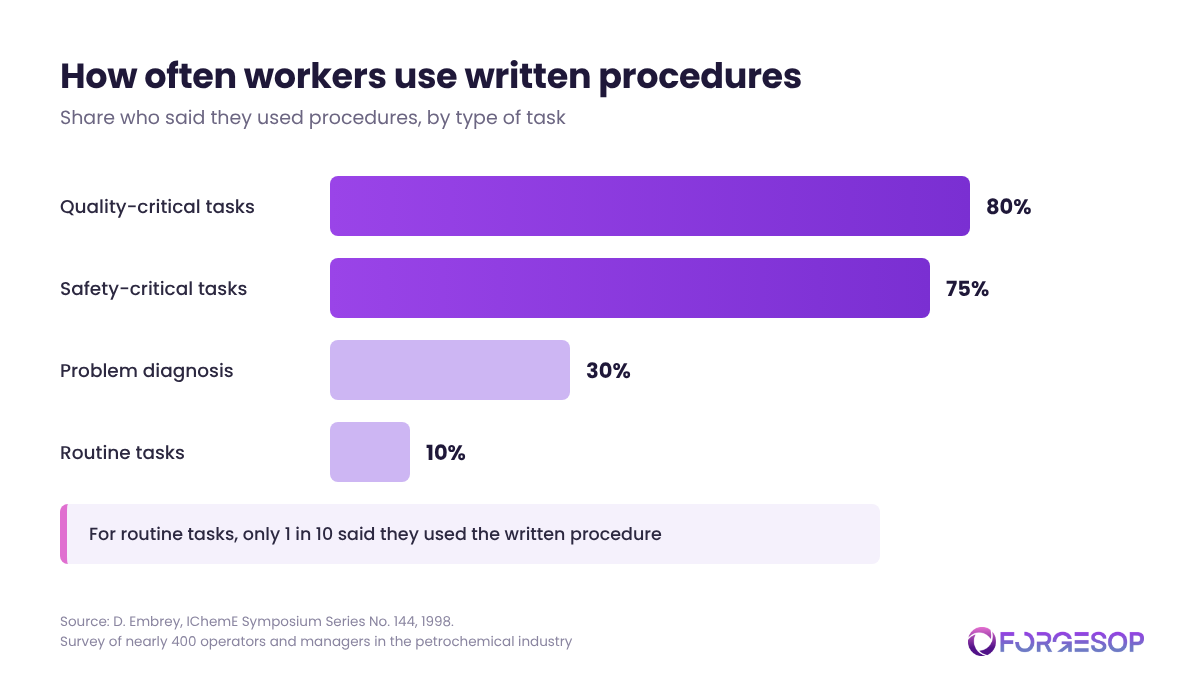
Routine tasks like these are also where written procedures get ignored most. In a 1998 survey of nearly 400 operators and managers in the petrochemical industry, presented to the Institution of Chemical Engineers (IChemE) by human factors researcher David Embrey, 80% said they used procedures for quality-critical tasks and 75% for safety-critical tasks, but only 30% did for problem diagnosis and 10% for routine tasks. The shorter and plainer the procedure, the better its chance of being opened at all.
When to Use the Simple Steps Format
Use the simple steps format when a task has ten steps or fewer and no decisions, start every line with a verb, and keep each line to one action.
2. Hierarchical Steps Format
The hierarchical steps format breaks a long task into numbered main steps, each with lettered sub-steps that hold the detail. An experienced worker can scan the main steps, while a new worker can read every line.
The most common uses for hierarchical steps are long tasks that still run in a fixed order:
machine changeovers
equipment calibration
lockout/tagout sequences
month-end financial close
setting up a new employee
preparing a batch in production
When to Use the Hierarchical Steps Format
Use the hierarchical steps format when a task has more than ten steps but still no decisions, and keep it to two levels. A third level of numbering is a sign that the task should be split into two SOPs.
3. Checklist Format
The checklist format turns the critical points of a task into a list of items that a person ticks off as each one is done or verified. Look out for it in:
pre-use inspections of forklifts, ladders and vehicles
shift handovers
permit-to-work sign-offs (written approval for high-risk jobs)
cleaning and sanitation rounds
audit preparation
surgical and aviation safety checks
A checklist does not teach a task, but it catches the step that gets skipped on a busy day.
When to Use the Checklist Format
Use the checklist format when trained people need to prove that critical steps were done, keep it to one page, and link it to the full SOP for anyone who needs the detail.
4. Table Format
The table format arranges a procedure in rows and columns, so you find your own row instead of reading the whole document. It includes role and action tables, sometimes called playscripts, which show who does what in order, and decision tables, which pair each condition with a response.
Everyday uses include:
spill response by chemical type
approval limits by purchase amount
storage rules by hazard class
alarm responses by alarm code
personal protective equipment (PPE) by task
retention periods by record type
escalation contacts by severity
cleaning frequencies by area
A table also exposes gaps. An empty cell shows you a situation nobody has planned for.
When to Use the Table Format
To use the table format well:
put the condition or the role in the first column
put the action in the next column, starting with a verb
keep to one action per cell
limit the table to four or five columns
repeat the header row on every page
5. Flowchart Format
The flowchart format draws a procedure as boxes joined by arrows, with a diamond wherever you have to make a decision. Examples include:
complaint and incident triage
equipment fault finding
deciding whether an injury must be recorded
handling a nonconformance (a product or process that fails a requirement)
chemical spill response
returns and refunds
Unlabeled arrows and decisions with no "no" branch make any flowchart harder to follow.
The gain is speed, because each reader follows only the path that applies to them.
The Environmental Protection Agency (EPA), the US environmental regulator, recommends flowcharts in its own SOP guidance to illustrate the process being described and to break up long sections of text. A flowchart that outgrows a single page needs to be split, or backed by a text SOP that carries the detail.
When to Use the Flowchart Format
Use the flowchart format when a task has many decisions, write every decision as a yes or no question, and keep the chart to one page. Ask the people who do the job to walk through every branch before you approve it.
6. Swimlane Format
The swimlane format is a flowchart divided into lanes, one for each role or team, so every step sits in the lane of the person who does it. Typical uses are:
purchase requests and approvals
change control (reviewing a change before it is made)
onboarding a new employee
customer complaint handling
Swimlanes make handoffs visible. Every arrow that crosses a lane is a point where work passes from one person to another, and a point where it can be dropped.
That matters more than it sounds. The Joint Commission, which accredits US hospitals, has estimated that 80% of serious medical errors involve miscommunication between caregivers when a patient is handed over.
When to Use the Swimlane Format
Use the swimlane format when a task crosses three or more roles. Name each lane by role and not by person, set the lanes in the order the work flows, and label what is handed over at every crossing.
7. Graphic Format
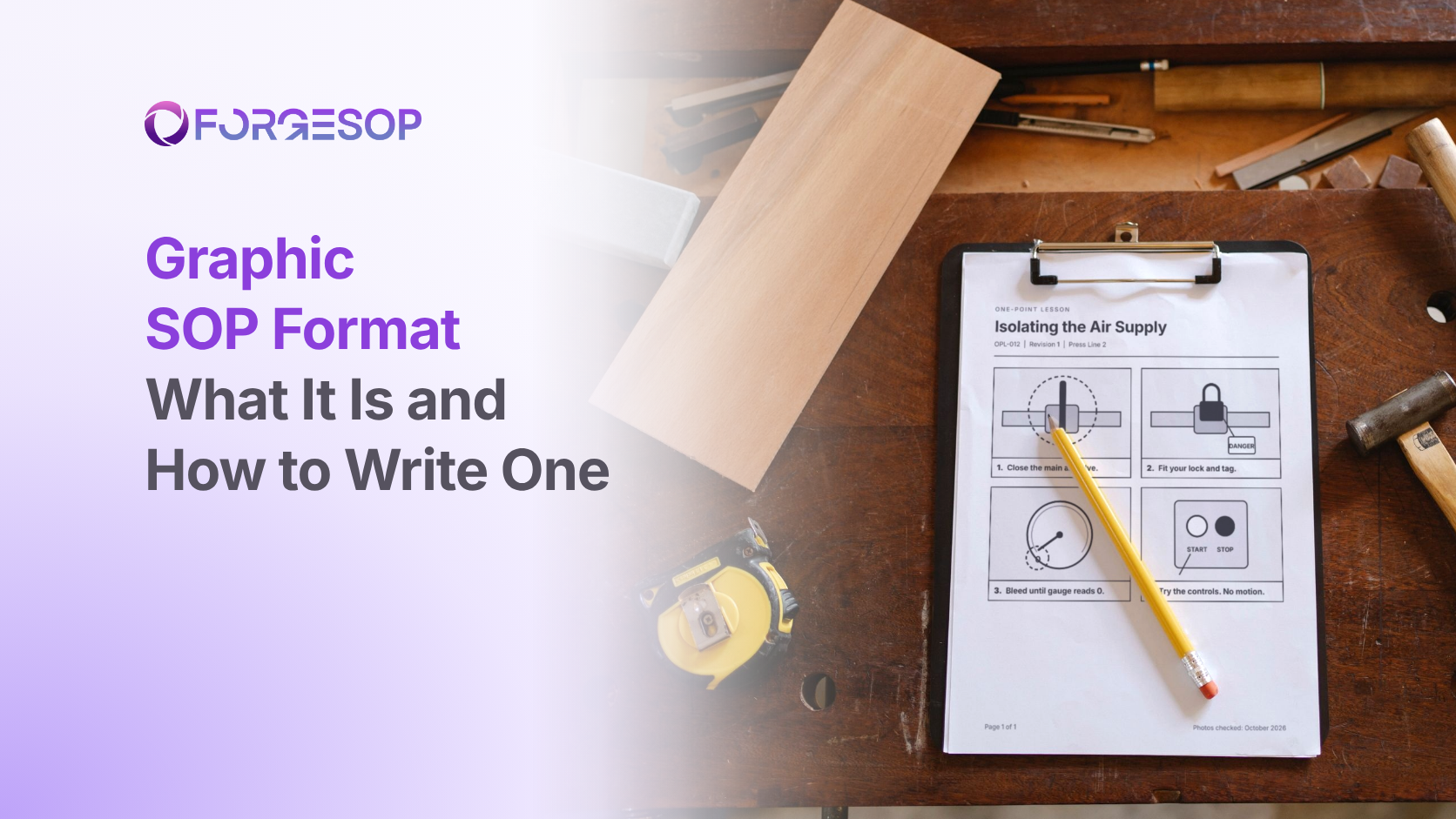
The graphic format shows each step as a photo or a diagram with a short caption. You match what you see on the page to what you see in front of you, which works across languages and reading levels.
In manufacturing, these documents are often called visual work instructions or one-point lessons. Watch for the graphic format in:
machine setup and changeover
lockout points and valve positions
handwashing and putting on protective clothing
product assembly
side-by-side examples of acceptable and unacceptable work
According to the National Center for Education Statistics (NCES), part of the US Department of Education, the share of US adults scoring at the lowest literacy levels (Level 1 or below) in an international survey of adult skills rose from 19% in 2017 to 28% in 2023. Many workplaces also run in more than one language: the US Bureau of Labor Statistics (BLS) reports that foreign-born workers made up 19.1% of the US civilian labor force in 2025.
When to Use the Graphic Format
Use the graphic format when words fall short: take one photo per step, mark the part that matters with an arrow or a circle, and keep each caption to one line.
8. Video Format
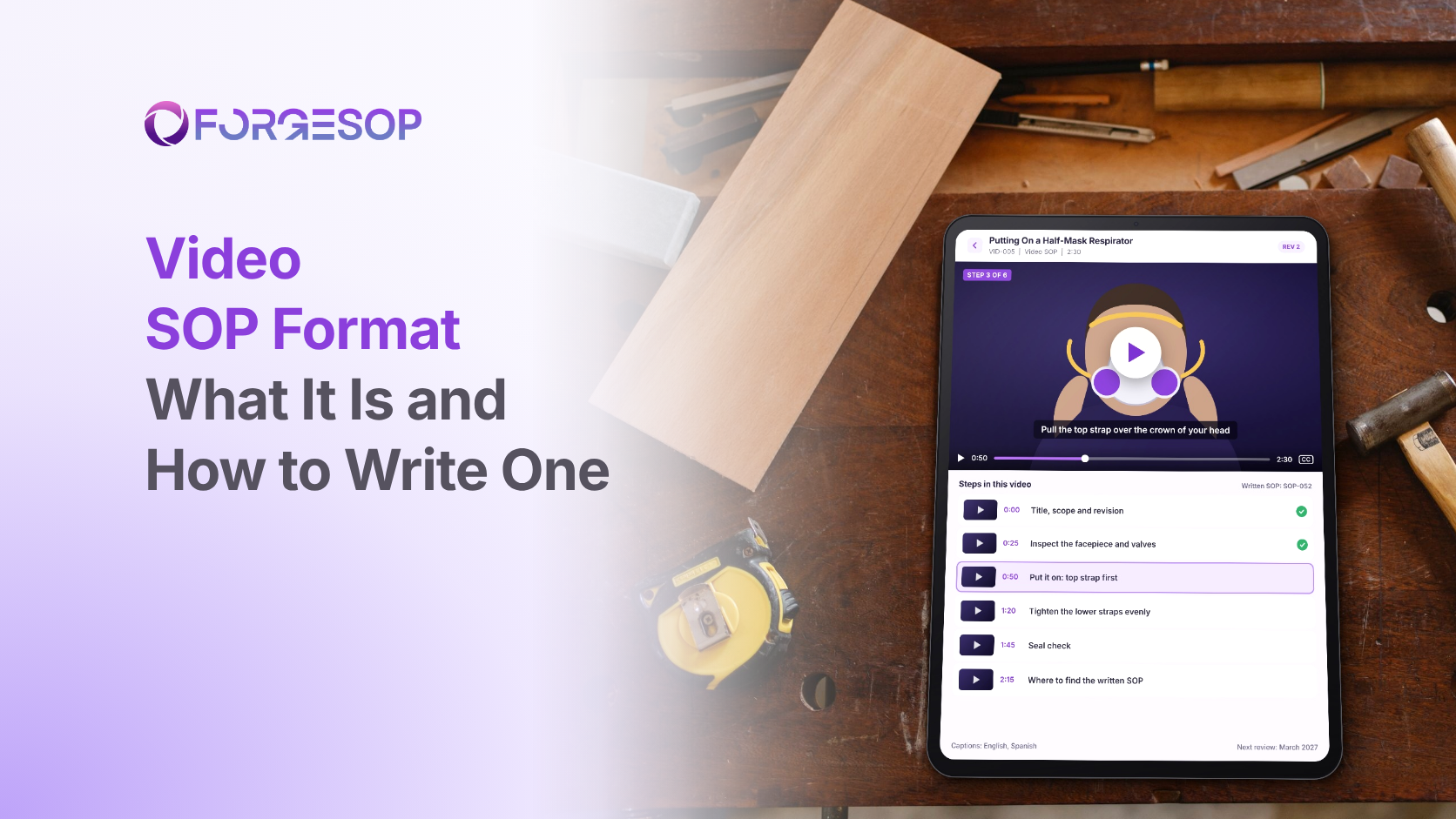
The video format records a competent person doing the task, with narration or captions, and it shows movement, timing and technique in a way no still image can. The best-known examples are training clips, and the most common weakness is upkeep. Common uses include:
fitting and checking a respirator
safe lifting and patient handling
knife skills and food preparation
operating machine controls
putting on and taking off protective clothing
software walkthroughs
A video is hard to skim, hard to search and hard to audit, so people often treat it as training material and not as a controlled procedure. It still needs the same control as any other SOP: an owner, a version and a review date.
A changed step, by contrast, is easy to fix in text and costly to fix on film: one edit to a written SOP can mean a full reshoot of the video.
When to Use the Video Format
Use the video format when motion matters, keep each clip to one task and under three minutes, and pair it with a written SOP that carries the approved steps.
What Are the Common SOP Formats in Different Workplaces?
Every workplace uses several formats at once. An office relies mainly on simple steps, tables, flowcharts and swimlanes, while a factory or a hospital uses five of the eight.
SOP Format Examples by Setting
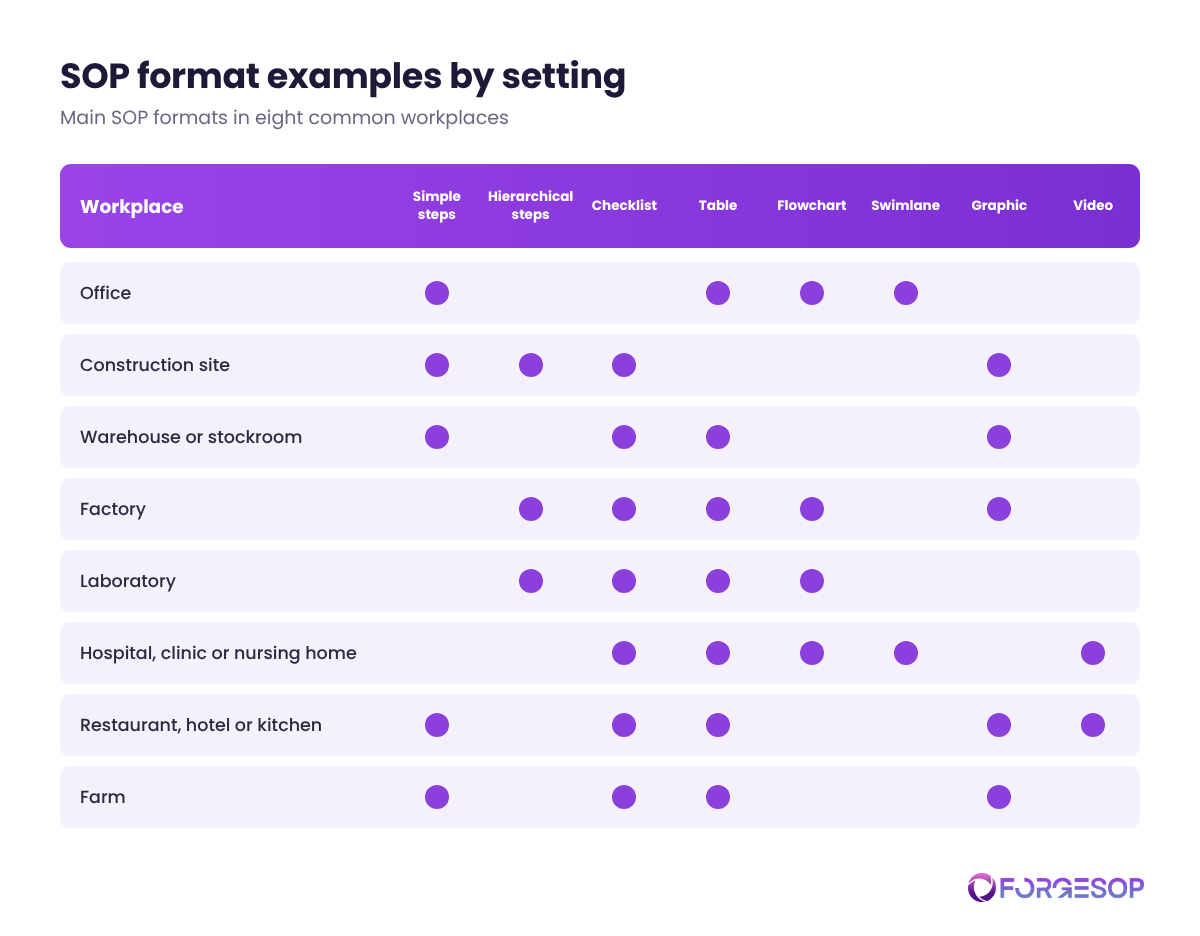
Workplace | Main formats | Examples |
|---|---|---|
Office | Simple steps, table, flowchart, swimlane | Password resets, approval limits by purchase amount, complaint escalation, purchase approvals across departments |
Construction site | Simple steps, hierarchical steps, checklist, graphic | Toolbox talk routines, lift plans, pre-use equipment inspections, scaffold assembly diagrams |
Warehouse or stockroom | Simple steps, checklist, table, graphic | Receiving a delivery, forklift pre-use checks, storage rules by hazard class, rack load signs |
Factory | Hierarchical steps, checklist, table, flowchart, graphic | Machine changeovers, startup checks, alarm responses by code, fault finding, photo setup sheets |
Laboratory | Hierarchical steps, checklist, table, flowchart | Test methods, instrument calibration checks, sample acceptance criteria, out-of-specification results |
Hospital, clinic or nursing home | Checklist, table, flowchart, swimlane, video | Surgical safety checks, isolation precautions by infection, triage pathways, patient handovers, patient-lifting clips |
Restaurant, hotel or kitchen | Simple steps, checklist, table, graphic, video | Opening and closing routines, cleaning rounds, cooking temperatures by food, handwashing posters, knife skills clips |
Farm | Simple steps, checklist, table, graphic | Milking routines, tractor pre-start checks, mixing rates by product, posted photo guides |
In factories, the lockout/tagout standard from the Occupational Safety and Health Administration (OSHA), the US workplace safety regulator, requires documented procedures that clearly and specifically outline how hazardous energy is controlled, including the steps for shutting down, isolating and securing machines and equipment. It was OSHA's third most cited standard in preliminary data for fiscal year 2026, with 1,863 violations. The standard sets what a safety SOP must contain, and it leaves the format to you.
The clearest evidence that format changes results comes from hospitals. In 2007 and 2008, researchers working with the World Health Organization (WHO) followed 7,688 surgical patients at eight hospitals in eight cities, from Seattle and Toronto to New Delhi and Ifakara in Tanzania: 3,733 before a 19-item checklist was introduced and 3,955 after.
The surgical teams already knew every step. The checklist changed the format, not the knowledge.
What Changed When Eight Hospitals Switched to a Checklist
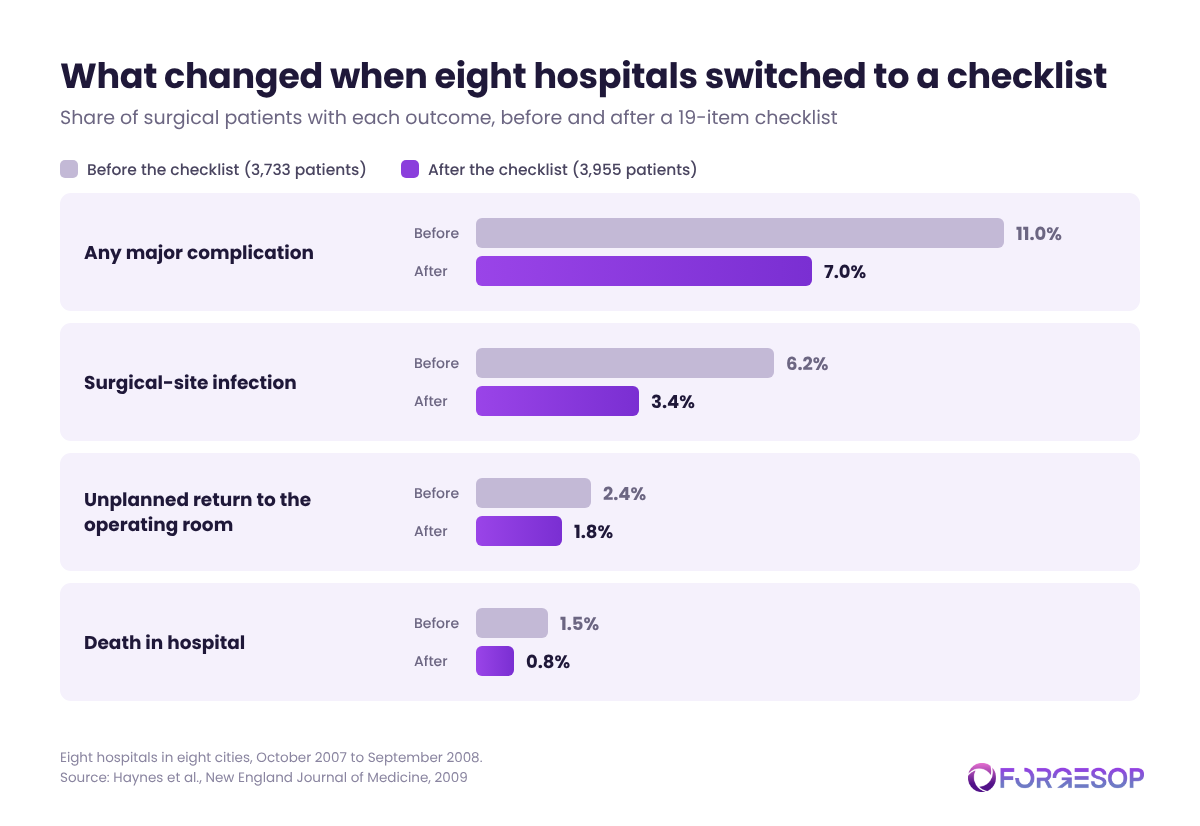
The study, published in the New England Journal of Medicine in 2009, found that the share of patients with a major complication fell from 11.0% to 7.0%, and that deaths fell from 1.5% to 0.8%. Surgical-site infections fell from 6.2% to 3.4%, and unplanned returns to the operating room from 2.4% to 1.8%.
How Do You Choose an SOP Format?
You choose an SOP format by asking two questions about the task: does it involve many decisions, and does it have more than ten steps? Few steps and no decisions point to simple steps, many steps and no decisions point to hierarchical steps or graphics, and many decisions point to a flowchart. That test comes from a writing guide Penn State published for dairy farms in 2001, and it works just as well in a factory. Document owners make the final call, but every author should:
Count the steps in the task, from the trigger to the finished result.
Count the decisions, meaning every point where the next step depends on an answer.
Count the roles, because a task that crosses teams needs lanes or a role column.
Look at where the SOP is read, such as at a desk, on a tablet or on a laminated card at the machine.
Weigh the risk and how often the task is done, because rare, high-risk tasks need more detail than daily ones.
How Do You Keep SOP Formats Consistent?
You keep SOP formats consistent by starting with the simplest format that fits and adding structure only when the task demands it:
start with simple steps,
add sub-steps when a step needs detail,
add a table or a flowchart when the task branches,
add lanes when the work crosses roles, and
add photos or video last, where words fall short.
Simple formats are cheaper to write, quicker to update and easier to audit. Turning a ten-step list into a flowchart adds nothing the list did not already say, and it adds work at every revision.
Document owners decide which SOPs to fix first by rating the risk of each task, meaning how likely an error is and how bad it would be. A confusing SOP for entering a confined space deserves attention before a confusing SOP for ordering stationery.
No regulator will make the choice for you. The EPA's SOP guidance says there is no one correct format, and ISO 9001, the quality management standard from the International Organization for Standardization (ISO), expects each document to be in a format that suits the people who use it.
A small set of approved templates, one for each format, records the choice. Every template carries the same core sections, so what an SOP should include stays constant while the layout of the steps changes.
Your part is to use the approved template for the format you chose and never invent a new layout for a single document. Before you publish an SOP, take these steps:
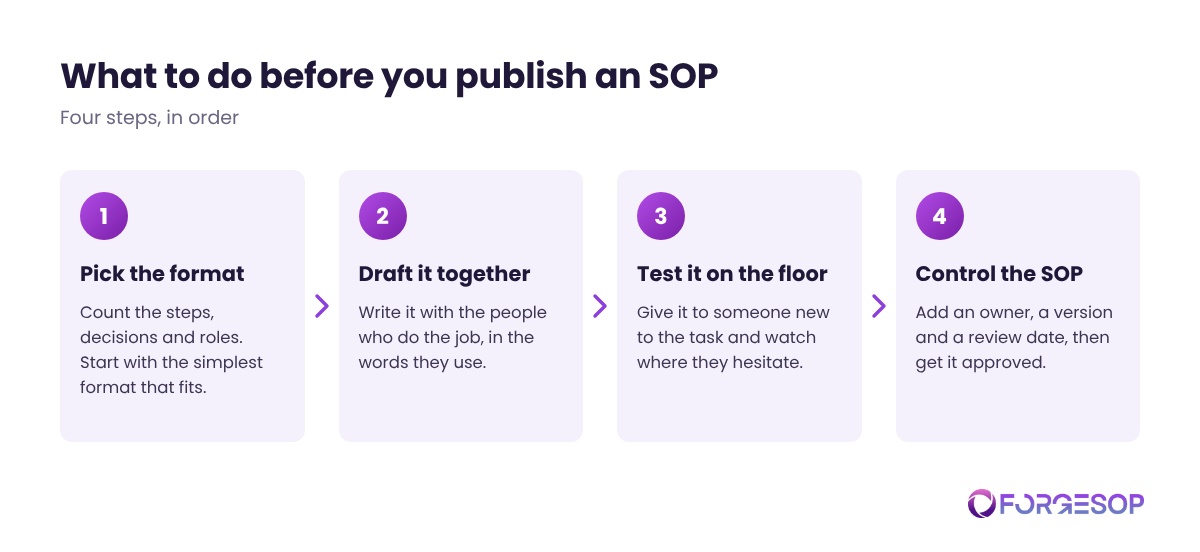
If your organization has a document controller (the person who manages templates, versions and approvals), you can also take the draft to them.
Give Every SOP an Owner and a Review Date
An SOP in the right format still goes stale. Without a named owner, a flowchart can describe a machine that was replaced last year, and nobody notices until an audit or an incident.
Set a review date for every SOP, assign an owner and control every change. The EPA's guidance suggests a systematic review every one to two years, and sooner whenever the task itself changes.
The reality is that a shared folder rarely manages this on its own. Purpose-built SOP management software keeps one current version, a named owner and a review reminder for every document, whatever its format.
The bottom line: the right format is the one your people will open, follow and keep current. Start with your most-used SOP, check it against the eight formats, and fix the mismatch before it becomes an incident.
Frequently Asked Questions
What Is the Difference Between an SOP Format and an SOP Template?
The difference between an SOP format and an SOP template is that a format is the way the steps are laid out, such as a checklist or a flowchart, while a template is the reusable document that holds them, with fixed sections for the title, purpose, scope, owner and revision history. One template can hold more than one format.
Who Is Responsible for Choosing an SOP Format?
The document owner is responsible for choosing an SOP format, and that is usually the manager of the process the SOP describes. The author drafts it with the people who do the job, and document control, the function that manages templates, versions and approvals, keeps the approved templates consistent.
What Is the Best SOP Format?
The best SOP format is the simplest one that fits the task. Simple steps suit short routine tasks, hierarchical steps suit long ones, and flowcharts suit tasks with many decisions. Whatever you choose, avoid long narrative paragraphs for the steps themselves, because they hide the actions a person has to take.
What Are the Effects of Using the Wrong SOP Format?
The effects of using the wrong SOP format are skipped steps, slower training and procedures that nobody opens. In the 1998 IChemE survey of petrochemical operators and managers, only 58% of those who said they used procedures had them open in front of them while doing the work.
Does OSHA Require a Specific SOP Format?
No, OSHA does not require a specific SOP format. OSHA standards say what a written procedure must contain, not how it must look. The lockout/tagout standard requires procedures that clearly and specifically outline how to control hazardous energy, and it requires each one to be inspected at least once a year, but it leaves the layout to the employer.
Want every SOP in one place, whatever its format? ForgeSOP keeps your procedures versioned, acknowledged, and reviewed on schedule, so the format you chose stays the version people follow.
General
Forge better processes
One platform. Always audit-ready.
Bring SOPs, checklists, audits, incidents, and CAPAs into one connected system for safer, clearer, and more consistent operations.
No credit card required · Built for teams that run on process