

General
Back to Blog
General5 min read
Swimlane SOP Format: What It Is, an Example, and How to Write One
A supervisor orders a new degreaser because it cleans faster. Purchasing places the order. Stores receives the drum and puts it on a shelf. Weeks later, an environment, health and safety (EHS) audit finds a product with no safety data sheet (SDS) on file and no assessment of its hazards.
Every person did their own part. Nobody owned the handoffs between them.
The swimlane format is built to make those handoffs visible. It is one of the eight types of SOP formats, and the right choice whenever a process crosses teams. In this article, we cover what a swimlane SOP is, when to use one, a worked example and how to write one in six steps.
Key takeaways
A swimlane SOP is a flowchart split into lanes, one for each role or team, so every step sits in the lane of the person who does it.
Use it when a task crosses three or more roles.
Every arrow that crosses a lane is a handoff. Label what is being handed over.
Name lanes by role, not by person, so the SOP survives staff changes.
What is the swimlane SOP format?
A swimlane SOP is a flowchart divided into parallel lanes, like a swimming pool seen from above. Each lane belongs to one role or team, and each step sits in the lane of whoever does it.
The idea is older than most people think. Multi-column process charts were in use in the 1940s, and Geary Rummler and Alan Brache gave "swim lane" diagrams their name in their 1990 book Improving Performance. Business Process Model and Notation (BPMN), a modeling standard maintained by the Object Management Group (OMG), later made lanes part of its formal notation, with version 2.0 released in 2011.
Most SOPs don't need full BPMN. Lanes, boxes, diamonds and labeled arrows are enough.
Why do handoffs need their own format?
Handoffs are where work gets dropped. The Joint Commission, which accredits US hospitals, has estimated that 80% of serious medical errors involve miscommunication between caregivers when a patient is handed over.
A standard flowchart shows what happens. A swimlane also shows who does it, and that makes every handoff impossible to miss: each one is an arrow crossing from one lane into the next.
When should you use the swimlane format?
Use the swimlane format when a task crosses three or more roles. Typical examples include:
new chemical approval
purchase requests and approvals
change control, meaning reviewing a change before it is made
onboarding a new employee
customer complaint handling
Choose something else when one person does the whole task, which suits simple steps or a plain flowchart. If you need more than about six lanes, the process is probably two processes.
Swimlane SOP example
Here is the degreaser story rebuilt as a swimlane.
SOP-040: New Chemical Approval
Lanes: Requester, EHS, Purchasing, Stores.
Step | Lane | Action | Hands over
|
|---|---|---|---|
1 | Requester | Submit a request with the product name, supplier and intended use | Request to EHS |
2 | EHS | Get the SDS from the supplier and review the hazards | |
3 | EHS | Decide: approved? If no, return to the requester with a safer alternative | Decision to Requester |
4 | EHS | Add the SDS to the library and set the storage class and personal protective equipment (PPE) | Approval to Purchasing |
5 | Purchasing | Raise the purchase order for the approved product only | Order details to Stores |
6 | Stores | Receive the product, check the label against the SDS and store it by hazard class |
The table is the text version of the diagram below, which is useful for screen readers and for anyone who prefers to read in rows.
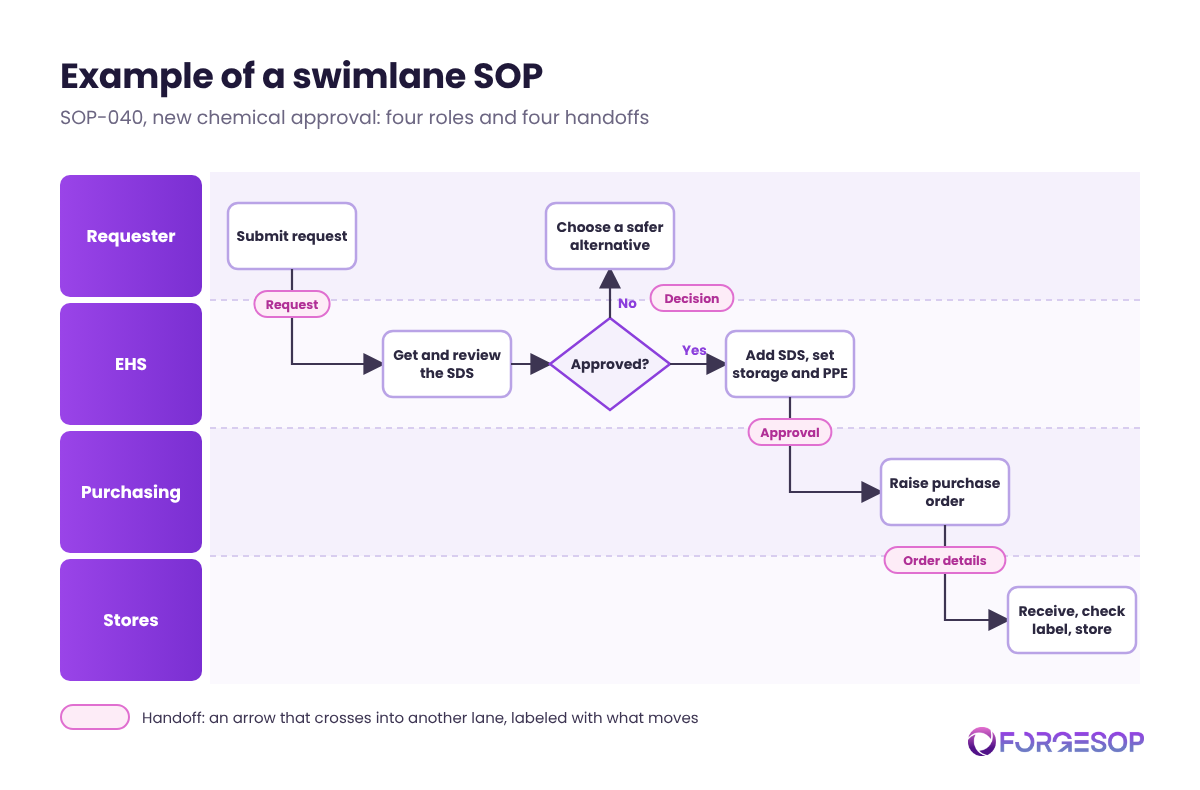
Look at the arrows that cross lanes: request, decision, approval, order details. Those four handoffs are exactly where the original process failed.
How to write a swimlane SOP in 6 steps
List the roles involved. Include outsiders such as suppliers or contractors if they act in the process.
Order the lanes in the order the work flows. The role that starts the process goes first.
Place each step in the lane of whoever does it. If two roles share a step, decide who owns it.
Put each decision in the decision maker's lane. The diamond sits with the person who answers the question.
Label every lane crossing. Write what moves across: the request, the SDS, the order. An unlabeled handoff is a handoff nobody checks.
Review it with every lane in the room. Each role will spot gaps the others can't see.
The gaps live between the lanes
Swimlanes fail in a few predictable ways:
Lanes named after people. When Sam leaves, the SOP breaks. Use roles.
Missing lanes. A supplier or contractor who acts in the process needs a lane too.
Unlabeled crossings. If you can't name what is handed over, nobody can confirm it arrived.
No owner for the whole process. Each lane owns its steps, but someone must own the end-to-end flow.
That last point matters most. Purpose-built SOP management software gives each cross-team procedure a named owner, a version history and a review date, so the whole flow stays current, not just the individual steps.
Which formats pair well with swimlanes?
A flowchart handles decisions inside a single lane in more detail.
A table, in playscript form, gives the same process as rows for people who prefer text.
For a side-by-side comparison, see our guide to types of SOP formats.
The bottom line
Most process failures don't happen inside a team. They happen between teams. A swimlane SOP puts every handoff on the page, where you can name it, check it and own it.
Pick one process that crosses three teams, draw the lanes, and look hard at every arrow that crosses a line.
Frequently asked questions
What is a swimlane diagram in an SOP?
It is a flowchart divided into lanes, one for each role or team. Each step sits in the lane of the person who does it, so the diagram shows both what happens and who is responsible.
How many lanes should a swimlane SOP have?
Usually three to six. Fewer than three rarely needs lanes at all. More than six usually means the process should be split into smaller ones.
What is the difference between a swimlane and a flowchart?
A flowchart shows the sequence of steps and decisions. A swimlane adds lanes that show who does each step, which makes handoffs between roles visible.
Want every SOP in one place, whatever its format? ForgeSOP keeps your procedures versioned, acknowledged, and reviewed on schedule, so the steps people follow are always the current ones.
General

Forge better processes
One platform. Always audit-ready.
Bring SOPs, checklists, audits, incidents, and CAPAs into one connected system for safer, clearer, and more consistent operations.
No credit card required · Built for teams that run on process