

General
Back to Blog
General22 min read
IT and Security SOPs: What They Are, Examples, and How to Write One
The call came in at 4:50 p.m. on a Friday. The caller said she was the plant controller, she had a new phone, and she was locked out of her account an hour before the payroll approval deadline. She knew her employee ID, her manager's name, and the name of the payroll system. The technician on the help desk, eight months into the job and keen to help, reset her password and moved her multi-factor authentication to the new phone. By Monday morning the real controller was asking why her login had stopped working, and the bank details for three suppliers had changed.
Nobody broke anything in that story. Someone was simply let in.
Most organizations have security policies. The information security policy is signed at onboarding, the acceptable use policy sits on the intranet, and the security tools are paid for. Far fewer have security procedures: the step-by-step instructions a help desk technician follows before resetting a password, an accounts payable clerk follows before changing a supplier's bank details, and human resources (HR) and information technology (IT) follow together on someone's last day.
IT and security SOPs close that gap. This guide, the ninth in our series on the types of SOPs, covers what an IT and security SOP is, how it differs from the policy above it and the other SOP types beside it, which procedures to write first, what belongs inside each one, and a seven-step method for writing procedures that hold up against auditors and attackers alike.
Quick answer: An IT and security SOP (standard operating procedure) is a written, step-by-step instruction for a recurring task that touches your systems, accounts, data, or devices: granting and removing access, verifying identity before a reset, patching, backing up and restoring data, handling devices, and responding to security incidents. It names who does each step, the checks that come first, and the record that proves it.
Key takeaways
IT and security SOPs turn security policy into repeatable steps: granting and removing access, verifying identity, patching, backing up and restoring, handling devices, and responding to incidents.
Most of them are run by people outside IT (HR, finance, the front desk, supervisors), so they must be written for those people.
Standards ask for procedures, not just policies. ISO/IEC 27001 includes a control for documented operating procedures, and the Payment Card Industry Data Security Standard (PCI DSS) asks whether procedures are in use and known to everyone affected.
The risk is measurable. IBM and the Ponemon Institute put the 2026 global average cost of a data breach at $4.99 million, and the FBI logged about $3.05 billion in business email compromise losses in 2025.
These are the only SOPs written against an adversary. Put verification before action, so a convincing caller or an urgent email cannot talk anyone past a check.
Procedures drift as fast as the tools do. Tie every IT and security SOP to change management, test it, and review it after every incident, near miss, and system change.
What is an IT and security SOP?
An IT and security SOP is a standard operating procedure for a recurring task that touches your systems, accounts, data, or devices. It takes a control your policy promises (access is removed when people leave, backups can be restored, suspicious emails get reported) and converts it into named roles, ordered steps, time targets, verification checks, and the record that proves each step happened.
The scope is wider than the IT department's ticket queue. It covers information technology in the broad sense: computers, networks, accounts, software, cloud services, and data. On industrial sites it also covers operational technology (OT): the programmable logic controllers (PLCs), human-machine interfaces (HMIs), and engineering workstations that run equipment, and that a maintenance contractor may plug a laptop into on a Tuesday afternoon.
If the term SOP itself is new ground, start with our plain-language guide to what an SOP is and come back; this article assumes the basics and goes deep on one category.
A policy is not a procedure.
Your information security policy states intent: least-privilege access, prompt removal of leavers, regular backups, incident reporting. It tells an auditor what you believe. It does not tell the service desk technician what to do when a leaver ticket lands at 5 p.m.
The procedure does. When HR closes a leaver ticket, disable the directory account at the end of the person's last shift, revoke active sessions, remove their multi-factor authentication (MFA) devices, remove them from every application in the access register, collect the laptop and badge, rotate any shared password they knew (including the login on the line 3 HMI), and record each step in the ticket.
The standards draw the same line. ISO/IEC 27001, the international standard for information security management, includes a control (5.37 in the 2022 edition) requiring operating procedures for information processing facilities to be documented and made available to the people who need them. PCI DSS, the security standard for anyone who stores, processes, or transmits payment card data, opens each of its requirements by asking whether the related security policies and operational procedures are documented, kept up to date, in use, and known to all affected parties.
"In use" and "known" are the words that matter. A policy cannot meet them on its own.
Most IT and security SOPs are run by people outside IT.
HR starts the joiner and leaver process. Line managers approve access. Accounts payable decides whether a change to a supplier's bank details is real. The front desk issues visitor badges, maintenance technicians connect laptops to control panels, and equipment vendors connect remotely to support their machines.
IT designs most of the controls, but the rest of the organization operates them. An IT and security SOP is how those controls survive contact with everyone else, which is why it has to be written in their language rather than the administrator's.
How are IT and security SOPs different from other SOP types?
Every SOP type shares the same skeleton: numbered steps, named roles, a revision block. What changes is the risk each type controls. An operational SOP protects the consistency of your core work, a quality SOP protects the product, a safety SOP prevents harm during planned work, a compliance SOP proves the rules were followed, and an emergency and incident response SOP limits harm when prevention fails. An IT and security SOP protects the confidentiality, integrity, and availability of your systems and data: who can see it, whether it can be trusted, and whether it is there when you need it.
Compliance SOPs | Emergency and Incident Response SOPs | IT and Security SOPs | |
|---|---|---|---|
Primary job | Proving the rules were followed | Limiting harm when prevention fails, then recovering in order | Protecting systems and data from misuse, loss, and attack |
Who runs them | Compliance leads and the process owners each rule names | Floor wardens, first aiders, shift leads, the safety lead | IT, plus HR, finance, the front desk, supervisors, OT engineers, and vendors |
Typical trigger for writing one | A new rule, an audit finding, a license condition | A hazard assessment scenario, a failed drill, an actual event | A new system, an audit or customer security questionnaire, a phishing near miss, an incident |
Core content | Rule citation, evidence, records, deadlines | Activation criteria, role cards, first actions, notification ladder | Systems in scope, verification checks, ordered steps, time targets, evidence |
Cost of failure | Fines, lost licenses, failed audits | Loss of life, escalation, late-reporting penalties | Breach costs, fraud losses, downtime, disclosure duties, lost customer trust |
Review cadence | Annual, plus every rule change | After every drill, incident, and near miss | Every system or tool change, every incident and near miss, and at least annually |
Sign-off | Compliance lead, often with legal | Safety lead and site leader | IT or security lead, with the business owner of each process |
The column on the right has one property no other column shares: an adversary. A hazard does not study your org chart. A leaking drum does not wait for the Friday before a holiday weekend, call the help desk, and sound exactly like your controller. Attackers do, and they look for the step where a helpful person will skip a check. Every design choice in an IT and security SOP follows from that: verification before action, two people for the riskiest changes, and a written rule that urgency is a reason to slow down rather than speed up.
In practice the categories overlap, and that is fine. A ransomware attack that stops a production line is an emergency and incident response event as much as an IT one. Joiner and leaver steps are shared with your HR and training SOPs. Changing a supplier's bank details belongs equally to the payment procedures in your administrative SOPs, and patching a control system during planned downtime is coordinated with your maintenance SOPs. Write one SOP for the task and tag it into every category it touches, a point our types of SOPs guide makes across all ten types.
Most breaches start with a routine task done slightly wrong.
The numbers behind this category are large, but read them as procedure failures and they become manageable.
Verizon's 2026 Data Breach Investigations Report (DBIR) found that 31% of breaches now start with the exploitation of software vulnerabilities, overtaking stolen passwords as the most common way in, and that 48% of breaches involve ransomware. Both are procedure problems before they are technology problems. Many vulnerabilities get exploited because nobody owned the patch. Ransomware turns from a bad week into a business-stopping crisis when nobody has tested whether the backups can be restored.
The financial cost keeps climbing. IBM and the Ponemon Institute put the global average cost of a data breach at $4.99 million in their 2026 report, a 12% increase over the previous year.
Some of the most expensive failures need no hacking at all. The Internet Crime Complaint Center (IC3) of the Federal Bureau of Investigation (FBI) received 1,008,597 complaints in 2025, with reported losses of $20.9 billion. Business email compromise (BEC), in which a criminal impersonates an executive or a supplier to redirect a payment, accounted for 24,768 of those complaints and about $3.05 billion in losses, according to the 2025 Internet Crime Report. The same report names critical manufacturing among the sectors most affected by the top ransomware variants. A BEC loss is, almost by definition, a verification step that did not exist or was skipped.
Help desks have become a favorite front door. A joint advisory from the FBI and the Cybersecurity and Infrastructure Security Agency (CISA) on the group known as Scattered Spider describes attackers calling IT help desks and convincing staff to reset passwords and transfer MFA tokens. No firewall stops that call. A procedure can.
Attackers rarely need to break in when someone will let them in.
The clock starts when you discover or decide.
Security incidents carry legal deadlines, and many run from the moment you discover an incident or decide it is serious. U.S. public companies must disclose a material cybersecurity incident on Form 8-K within four business days of determining it is material, under 2023 Securities and Exchange Commission (SEC) rules. Under the Health Insurance Portability and Accountability Act (HIPAA), a breach of unsecured health information must be reported to affected individuals, and to the Department of Health and Human Services when 500 or more people are affected, no later than 60 days after discovery. The EU General Data Protection Regulation (GDPR) expects notice to the supervisory authority within 72 hours where feasible. State laws, customer contracts, and cyber insurance policies add their own clocks.
None of those deadlines pauses while people debate whether an incident is serious. A procedure that names who decides, by when, and who makes each call keeps a security incident from also becoming a disclosure failure.
Why do IT and security procedures stay unwritten?
Because the knowledge lives in one or two heads. Many mid-sized organizations have an administrator who simply knows how to offboard someone, which shared passwords exist, and where the backups go. That works until the administrator is on vacation, or leaves.
Because the tools change faster than the documents. Every new software-as-a-service (SaaS) application or remote access tool quietly invalidates part of a procedure, and nobody budgets time to rewrite it.
Because policy plus technology feels like enough. The policy is signed and the tools are paid for, so the human step in between goes unexamined until it fails.
There is also a worry that writing procedures down hands attackers a map. It does not, if you write them well. A procedure describes steps, roles, and checks; passwords, network addresses, and configurations belong in a restricted vault that the procedure points to.
Which IT and security SOPs should you write first?
No organization needs eighty security procedures by the end of the quarter. Across industries, the highest-value IT and security SOPs cluster into six families. Start where your systems and data are most critical and where your people are most likely to be targeted.
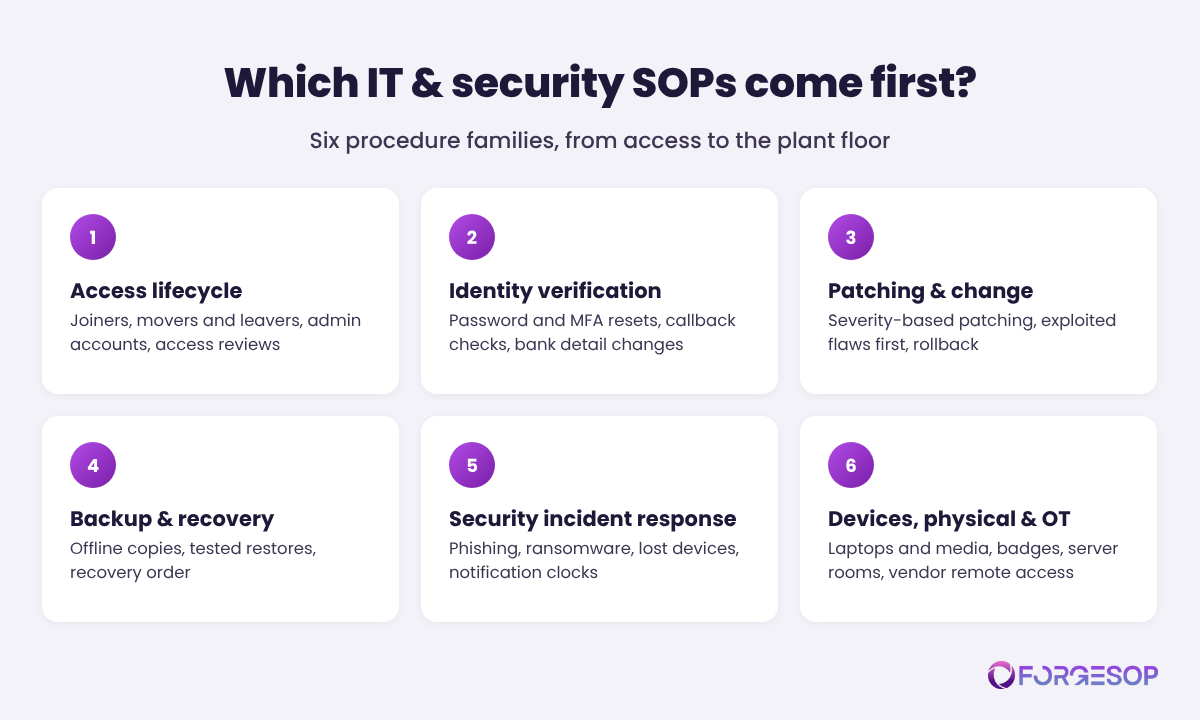
Access lifecycle: joiners, movers, and leavers. Creating accounts for new starters, changing access when people change roles, removing it the day they leave, managing administrator and shared accounts, and periodic access reviews. Start here: everyone passes through it, and an account that outlives its owner is one of the easiest ways in.
Identity verification and help desk requests. Password and MFA resets, call-back verification on a number already on file, requests from executives or their assistants, and any request to change bank details or payment instructions. This is the family attackers test most often, and the one most often run on goodwill.
Patching, vulnerabilities, and change. How updates are prioritized by severity, how quickly actively exploited vulnerabilities are fixed (CISA's Known Exploited Vulnerabilities catalog makes a useful "fix this first" list), how changes are tested and rolled back, and how OT systems are patched during planned downtime.
Backup, restore, and recovery. What is backed up and how often, where the offline copy lives, how restores are tested, and the order in which critical systems come back. CISA's ransomware guidance is blunt: maintain offline, encrypted backups of critical data and regularly test their availability and integrity.
Security incident response. Reporting a suspicious email, a lost or stolen device, malware or ransomware, a compromised account, or a data breach: containment, evidence preservation, escalation, the notification clocks, and recovery. The National Institute of Standards and Technology (NIST) aligned its incident response guidance, SP 800-61 Revision 3, with the NIST Cybersecurity Framework (CSF) 2.0 in April 2025.
Devices, physical access, and OT. Issuing, securing, and wiping laptops and phones, removable media, visitor sign-in and badges, server room and network closet access, vendor remote access to control systems, and the rules for any laptop that connects to plant equipment.
Two rules set the order inside the families. Follow the crown jewels: procedures for the systems that would stop production, expose regulated or personal data, or move money come first. Follow the targets: the help desk, accounts payable, HR, and executive assistants are the people attackers call and email, so the procedures they run should be written before the ones only administrators see.
What does an IT and security SOP include?
Most SOPs share the same foundation, covered in our guide to what an SOP should include. For IT and security procedures, the content comes down to ten building blocks:
Title, unique ID, and one task per document, such as SOP-902 Leaver Access Removal, not a forty-page "IT procedures" manual
Purpose, scope, and the systems in scope: named systems, including cloud applications and OT, and who the procedure applies to
Roles and segregation of duties: requester, approver, executor, and verifier, and no one approves their own privileged access or payment change
Definitions: every acronym spelled out, such as single sign-on (SSO) and virtual private network (VPN), plus classifications like data sensitivity or incident severity
Triggers and required inputs: what starts the procedure (an HR ticket, an alert, a call, a reported email) and what must exist before step one
The verification step: how identity and authority are confirmed before anything changes, using a channel the requester did not supply
Ordered steps with time targets: imperative and numbered, with deadlines wherever timing is the control, such as "disable within one hour of the last shift"
Evidence and records: the ticket, approvals, or logs that prove each step happened, and how long they are kept
Exceptions and escalation: what to do when a system is down, an approver is away, or a request arrives marked urgent from someone senior
Revision block, review triggers, and test schedule: version, owner, approver, effective date, the events that reopen it, and how often it is tested
Two of these blocks do the heavy lifting, and they are the two most often missing.
The verification step turns a request into a decision. Most IT procedures assume every request is real: receive it, act on it, close the ticket. The verification step assumes it might not be. Call back on the number in the HR system, never the one in the email or voicemail. Confirm a bank detail change with a known contact at the supplier, using your own records. Require a second approver for privileged access and payment changes. And write down, in plain words, that urgency, secrecy, and seniority are warning signs rather than reasons to skip the check. A technician who follows that procedure and annoys a real executive has done the job right.
The evidence step makes the control real. Auditors, customer security questionnaires, and insurers all ask the same question in different words: show me. Show me that leavers lose access on time, that a backup was restored last quarter, that the critical patch went in. If the evidence is a by-product of the work, in a ticket checklist or a system log, the answer takes minutes. If it has to be reconstructed from memory, the only accurate answer is that you do not know.
What does an IT and security SOP look like in practice?
Here is the skeleton of a typical one, trimmed for space.
SOP-902: Leaver access removal (v2.1, owner: IT Manager, review due: after the next identity system change or April 2027, whichever comes first). Purpose: remove every form of access a departing person holds, on time, with proof. Scope: employees, contractors, and temporary staff at all sites; every system in the access register, including cloud applications outside single sign-on, remote access, building access, and shared OT credentials. Trigger: HR raises a leaver ticket as soon as notice is given; for involuntary departures, HR tells the IT Manager before the meeting, and access is disabled while it takes place. Roles: HR confirms the last working day; the line manager confirms the applications and assets on the register; the service desk executes; facilities disables the badge; the OT engineer rotates shared control system passwords; the IT Manager verifies. At the end of the last shift: disable the directory account, revoke active sessions, remove registered MFA devices, disable remote access, and remove administrator rights. Within 24 hours: remove applications outside single sign-on, delete any mail forwarding rules, delegate the mailbox to the manager, rotate every shared password the person knew (including the line 3 HMI), and close vendor portal accounts in their name. Assets: laptop, phone, and keys are returned against the asset register and devices are wiped under SOP-905. Exception: if the leaver was an administrator, a second administrator rotates all administrator and service account credentials the same day. Verification: the IT Manager reviews the checklist within two business days, and the monthly access review compares the HR leaver list against every active account. Records: every step is timestamped in the ticket.
Nothing in it is clever, and that is the point. The account ends on schedule whether the person left on good terms or bad, the shared password on the plant floor changes even though nobody remembered it existed, and when an auditor asks for proof that leavers lose access on time, the answer is a report rather than a scramble.
How to write an IT and security SOP in 7 steps
The method matters more than the template, and for IT and security procedures the method starts with your systems and ends with a test.
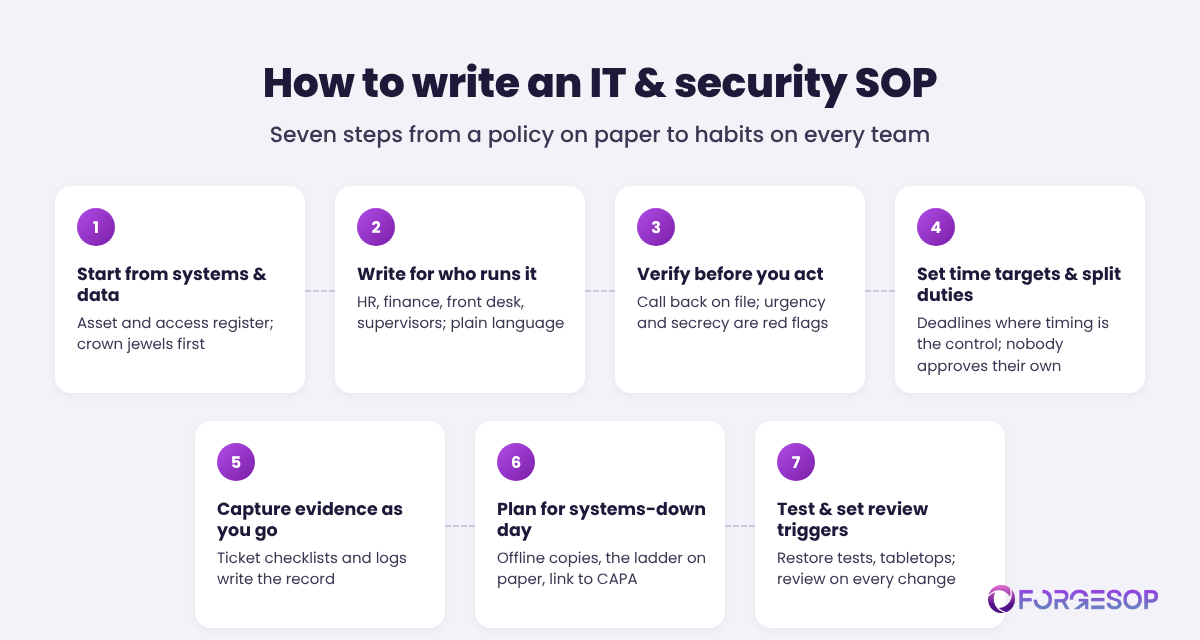
Start from your systems and data, not from a template. List the systems that matter, who has access to them, and the recurring tasks that touch them. If you have no asset and access register, building one is step zero. Mark the crown jewels (systems that stop production, hold regulated or personal data, or move money) and write their procedures first.
Write for the person who runs it. That is often an HR coordinator, an accounts payable clerk, a receptionist, or a shift supervisor. Use plain language, current screenshots, and defined terms. If the person running the step needs IT to interpret it, it is not finished.
Put the verification step before the action step. For every request that changes access, credentials, or payment details, decide how identity and authority are confirmed, using a channel the requester did not provide. Spell out the red flags: urgency, secrecy, a new phone number, a request to bypass the usual approver.
Set time targets and separate the duties. Timing is the control in many IT procedures: how fast access is removed, an exploited vulnerability is patched, or an incident is escalated. Write the targets in, and make sure whoever requests privileged access or a payment change never approves it.
Capture the evidence as a by-product. Build the steps into a ticket template or checklist so the record writes itself, and name what counts as proof for each step. A procedure whose evidence lives in someone's inbox will struggle at its first audit.
Plan for the day the systems are down. Incident procedures must work when email, the ticketing system, and the shared drive are unavailable, so keep printed and offline copies, as CISA recommends, with phone numbers and the notification ladder on paper. Link the after-phase to your emergency and incident response SOPs and your CAPA investigation process, so lessons become tracked corrective and preventive actions (CAPA).
Test it, then set the review triggers. Restore a backup and time it. Run tabletop exercises for ransomware and for a compromised account. Then tie reviews to events as well as the calendar: any new system, tool, or vendor; any incident or near miss (a phishing email that almost worked counts); any audit finding or organizational change; and at least annually.
The IT procedure that fails is the one written for last year's tools.
IT and security procedures rarely fail because they were badly written. They fail because the environment moved and the procedure did not. The company migrated to a new identity provider, and the offboarding SOP still points to the old directory. Marketing signed up for three cloud applications that never made it into the access register. The equipment vendor switched remote access tools, and the on-call number in the incident procedure belongs to an engineer who left in the spring.
Drift is more dangerous here than in most SOP families, because an attacker only needs the one step that went stale. We dissected what documentation drift costs in the hidden cost of uncontrolled SOPs, and IT procedures drift fastest of all because the tools underneath them never stop changing.
The countermeasures are familiar, applied with more discipline. Every IT and security SOP gets one named owner and a deputy. Every change ticket asks one extra question: which procedures does this change affect? Every procedure lives in one place, with one current version, and the people who run it acknowledge each revision. Purpose-built SOP management software makes this structural rather than heroic: version control, acknowledgments tracked by name, and review dates that remind the owner. However you solve it, keep a copy that works offline. The ransomware procedure is useless if it lives only on the server that was just encrypted.
In short, a procedure that matches today's systems beats a perfect one that matches last year's, every time.
The bottom line
IT and security SOPs are where your security policy stops being a statement of intent and starts being a set of habits. They decide whether the help desk calls back before resetting a password, whether a leaver's access ends on schedule, whether the critical patch goes in this week, and whether the backups can be restored when it counts.
Start with six families: access, identity verification, patching and change, backup and recovery, incident response, and devices and OT. Write them for the people who run them, put verification before action, capture evidence as you go, and tie every review to the changes that make procedures drift.
Your security tools will keep changing. Procedures are how your people keep up, in every department and on every shift, long after the person who configured the tools has moved on.
Frequently asked questions
What is an IT and security SOP?
An IT and security SOP (standard operating procedure) is a written, step-by-step document for a recurring task that touches an organization's systems, accounts, data, or devices, such as granting and removing access, resetting passwords, patching, backing up and restoring data, handling devices, and responding to security incidents. It names who does each step, the verification checks that must happen first, the time targets, and the record that proves the step was done.
What is the difference between an IT security policy and an IT SOP?
An IT security policy states what the organization commits to, such as least-privilege access, prompt removal of leavers' accounts, regular backups, and incident reporting. An IT SOP describes exactly how one of those commitments is carried out: who does what, in what order, with which checks, by when, and what evidence is kept. The policy sets the rule; the SOP is how people follow it.
What are examples of IT and security SOPs?
Common examples include new user setup, leaver access removal, privileged access management, password and multi-factor authentication resets, supplier bank detail change verification, patch and vulnerability management, backup and restore testing, security incident response, phishing reporting, lost or stolen device response, visitor and server room access, and vendor remote access to operational technology. Any recurring task that changes access, data, or systems is a candidate.
Are IT and security SOPs required?
Often, yes, through the standards and regulations an organization follows. ISO/IEC 27001 includes a control requiring documented operating procedures. PCI DSS asks whether security policies and operational procedures are documented, up to date, in use, and known to all affected parties. The HIPAA Security Rule requires covered entities to implement policies and procedures, keep that documentation for six years, and update it as operations change. Where no rule names them, customers, auditors, and insurers increasingly expect them anyway.
How often should IT and security SOPs be reviewed?
At least annually, and immediately after any event that changes how the task is done: a new system, tool, or vendor; an identity or network change; a security incident or near miss; an audit finding; or an organizational change. Procedures that protect critical systems, such as backup and restore or incident response, should also be tested on a schedule, because a test is the only way to know the procedure still works.
Who should write IT and security SOPs?
The IT or security lead owns them, but each one should be drafted with the people who run it: HR for joiners and leavers, finance for payment changes, the service desk for resets, facilities for physical access, and OT engineers for plant systems. The business owner of each process should approve it alongside IT, because the procedure commits their team.
Is it risky to write security procedures down?
Not if they are written well. A procedure should describe steps, roles, checks, and evidence, not secrets. Passwords, network addresses, and detailed system configurations belong in a restricted vault or appendix that the procedure points to. Undocumented procedures carry the bigger risk: they depend on one or two people's memory and leave room for attackers to talk someone past a step nobody wrote down.
Want every team to run the same security steps, every time? ForgeSOP keeps every IT and security SOP versioned, acknowledged, and easy to find, including for the people outside IT who run most of them.
General

Forge better processes
One platform. Always audit-ready.
Bring SOPs, checklists, audits, incidents, and CAPAs into one connected system for safer, clearer, and more consistent operations.
No credit card required · Built for teams that run on process